


Trailer and rear carrier
Vehicle features and options
This chapter describes model-specific equip-
ment, systems, and functions that are currently
available, or may become available in the fu-
ture, even if they are not
present in the vehicle.
Additional information:
Vehicle equipment, refer to page
.
Using trailers and rear carri-
ers
Principle
The trailer and rear carrier, e.g., rear bicycle
rack, can be connected to the vehicle. When
driving with a trailer or rear carrier, certain val-
ues and specifications for tongue weight, load,
tire pressure, the exterior mirrors, and electrical
consumption must be followed.
General information
For safe trailer operation, comply with all regu-
lations and the national legal requirements in
the respective
state.
The permissible trailer load, gross axle weight
rating, drawbar nose weight, and gross vehi-
cle weight rating are specified in the technical
data.
Tongue weight
The towing vehicle's maximum payload is re-
duced by the weight of the trailer hitch and the
tongue weight. The tongue weight increases
the vehicle weight. Do not exceed the ap-
proved gross vehicle weight of the towing vehi-
cle.
Loading
To load the trailer, distribute the cargo as
evenly as possible over the
loading surface.
Stow the cargo as low and close to the trailer
axle as possible. A low center of gravity in the
trailer increases the driving safety of the entire
trailer.
Do not exceed
the gross trailer weight and per-
missible trailer load of the vehicle. The smaller
value applies in each case.
Tire pressure
When towing a trailer, follow the tire pressure
specifications for the
vehicle and the trailer.
For the vehicle, the tire inflation pressure for
higher loads
applies.
For the trailer, the specifications of the manu-
facturer apply.
After
correcting the tire pressure or connecting
or disconnecting a trailer, reinitialize the flat tire
monitor or reset the Tire
Pressure Monitor.
Additional information:
▷
Tire pressure specifications, refer to
page
.
▷
Flat tire monitor, refer to page
▷
Tire Pressure Monitor, refer to page
Exterior mirrors
Exterior mirrors, which bring both rear edges
of the trailer into the driver's field of vision,
are available as optional accessories from an
authorized service center or another qualified
service center or repair shop.
Trailer and rear carrier
Driving tips
319
Online Edition
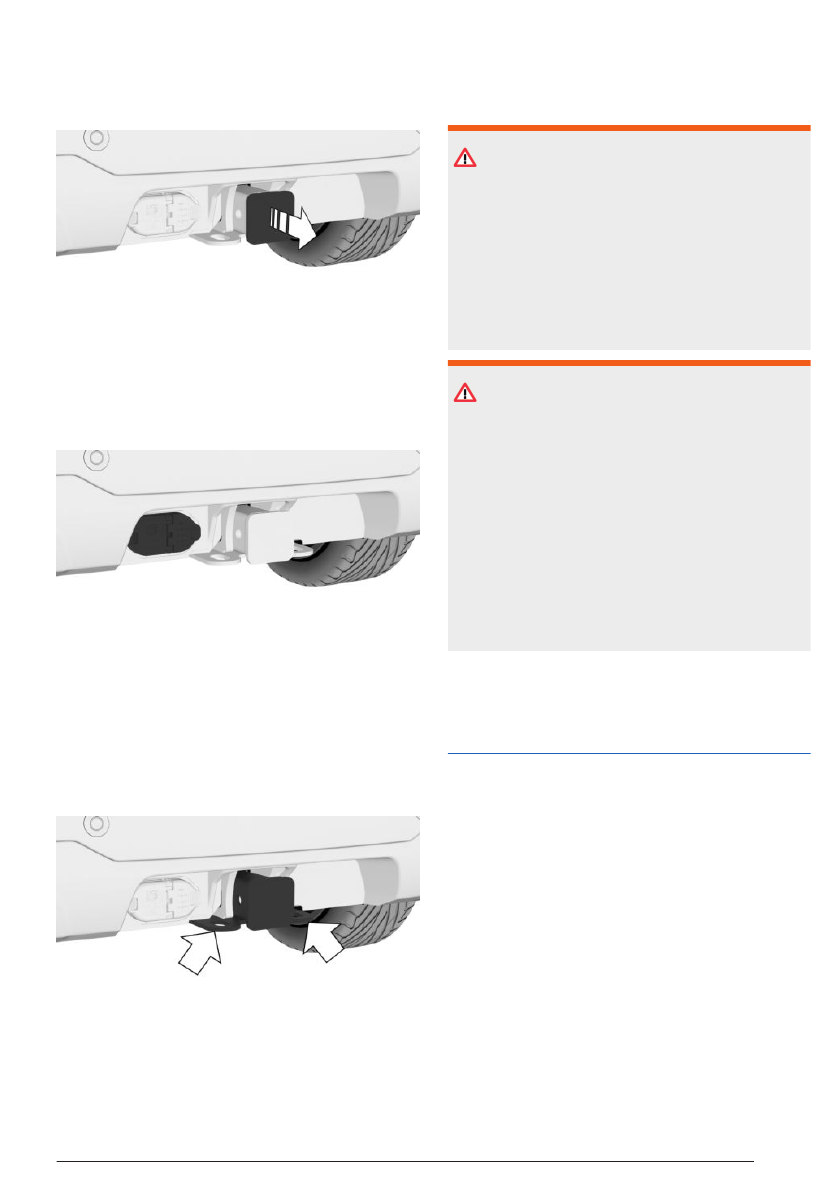
Removing the cover
Pull the cover to the rear out of the mount and
stow it in your vehicle.
Trailer power socket
The trailer power socket is located to the left of
the trailer hitch mount.
Loops for trailer safety chain
General information
Two eyes can be found on the mount for
the trailer hitch for attaching the trailer safety
chain.
Safety information
WARNING
If the trailer safety line or the trailer safety
chain is not fastened correctly, the trailer may
unintentionally come loose. There is a risk
of accident, injury, and property damage. Be-
fore driving with a trailer, correctly couple the
trailer safety line or the trailer safety chain to
the eye of the trailer hitch.
WARNING
If the trailer safety line or the trailer safety
chain is not fastened correctly, the safety line
or safety chain may get caught and cause
damage to the vehicle or trailer. There is a
risk of accident, injury, and property damage.
Before driving with a trailer, correctly couple
the trailer safety line or the trailer safety chain
to the eye of the trailer hitch. Ensure that the
safety line or safety chain can move freely
and is not dragging on the ground.
Driving with trailers or rear
carriers
Principle
To drive with a trailer or rear carrier, your
vehicle must meet certain requirements, e.g.,
trailer towing is activated. In certain driving sit-
uations, you must follow given instructions for
correct handling of your trailer or rear carrier,
e.g., when driving uphill or
downhill.
When driving with a trailer or rear carrier, some
driver assistance systems may be restricted or
not available. A Check Control message is dis-
played where applicable. The driving stability
control systems, e.g., Antilock Braking System,
are still
available.
Additional information:
Trailer and rear carrier
Driving tips
321
Online Edition

trailer. Depending on vehicle equipment, this
setting is considered by speed limit systems.
1.
Go through the menu as follows: Apps
menu / "Vehicle" / "Driving settings" /
"Driver Assistance" / "Trailer mode" / "Max.
speed".
2.
Select the desired speed.
Additional information:
▷
Speed Limit Info, refer to page
.
▷
Speed Limit Assistant, refer to page
.
Uphill grades
Permissible gradients
Trailer towing is permitted up to gradients of
12 %.
If higher trailer
loads are approved at a later
point in time, the permitted gradient limit is
8 %.
Driving off on uphill grades
When driving off on gradients with a vehicle-
trailer combination, use the parking brake to
prevent the vehicle-trailer combination from
rolling backwards.
1.
On the center console, press and
release the parking brake button shortly be-
fore driving off.
The
parking brake is set.
2.
Step on the accelerator pedal sufficiently to
drive off.
The parking
brake releases automatically
when the accelerator pedal is pressed.
Hills
A vehicle-trailer combination tends to sway
more on downhill
gradients.
Manually downshift to the next-lowest gear
before driving on a hill and drive downhill
slowly.
Trailer Assistant
Principle
The Trailer Assistant helps when reversing
with a trailer.
With
the Trailer Assistant, the steering wheel
is not used to steer the vehicle-trailer combina-
tion when reversing. The vehicle-trailer combi-
nation is steered by continuously entering and
correcting the articulation angle on the control
display or using the buttons for adjusting the
exterior mirrors. The articulation angle is the
angle between the vehicle and trailer. This an-
gle is thus the desired direction of travel for the
vehicle-trailer combination
in reverse.
When reversing, the system takes control of
steering the front wheels. The driver must con-
trol the speed using the accelerator and brake
pedals.
In addition,
note the information in Chapter
"Parking assistance
systems".
Additional information:
Parking assistance systems, refer
to page
Vehicle features and options
This system may not be available in the
owned vehicle, e.g. due to the selected op-
tional equipment, the national-market version
or the option for later enabling and software
updates. This also applies to individual func-
tions of the
system.
For information on whether a function is cur-
rently available in the vehicle or when the func-
tion can be installed in the vehicle, contact an
authorized service center or another qualified
service center or repair
shop.
Additional information:
Vehicle equipment, refer to page
.
Trailer and rear carrier
Driving tips
323
Online Edition

3.
Bring up the following menu via iDrive:
"Start Trailer
Assistant".
The control display shows the Rear View
Camera image with a view of the tow bar
and a stylized view of the vehicle with
trailer.
If the teach-in
process for the Trailer As-
sistant has not completed yet, follow the
instructions on the control display.
4.
Confirm or turn off operating tips on the
control display as necessary.
5.
If necessary, shift into reverse.
6.
Set the desired articulation
angle.
Follow the instructions on the control dis-
play.
7.
Take your hands off the steering wheel
and carefully drive off using the accelerator
pedal and the brake.
The status symbol for the Trailer Assis-
tant illuminates green. The system takes
over the steering.
When
driving in reverse, observe the vehi-
cle's surroundings.
In
case of obstacles, stop immediately and
take over steering.
8.
If necessary, adjust the kink angle while
driving to correct the direction.
9.
Engage selector lever position P when you
are finished maneuvering.
Canceling the Trailer Assistant
manually
Maneuvering of the car-trailer combination can
be aborted
manually:
Bring up the following menu via iDrive:
"Cancel".
Canceling the Trailer Assistant au-
tomatically
The Trailer Assistant is canceled automatically
in situations such as the following:
▷
When the driver grasps the steering wheel
or takes over steering.
▷
When shifting from reverse gear to selec-
tor lever position D, the Trailer Assistant
switches to standby
mode.
If reverse gear is engaged again after a
short distance, the function is active again.
▷
During activation or intervention by driver
assistance systems.
▷
When the view on the control display is
overlaid with messages.
▷
In case of a slippery surface.
▷
When the vehicle is rolling such as on a
slope.
▷
In case of changed ambient conditions.
▷
If the vehicle speed exceeds approx.
6 mph/10 km/h.
Activating/deactivating trailer safety
braking
Trailer safety braking helps prevent the vehi-
cle-trailer combination from rolling away in an
uncontrolled way. Whenever the Trailer Assis-
tant is canceled, trailer safety braking is ap-
plied and the vehicle is secured at a standstill.
Trailer safety braking can be activated or de-
activated.
Go through
the menu as follows: Apps
menu / "Vehicle" / "Driving settings" / "Driver
Assistance" / "Parking" / "Trailer protection
braking".
System limits
Speed threshold
The maximum speed is limited to approx.
6 mph/10 km/h.
If the
maximum speed is exceeded, the func-
tion is interrupted.
A
warning is given at a speed of approx.
4 mph/7 km/h.
Trailer and rear carrier
Driving tips
325
Online Edition
Rear carriers
Principle
Rear carriers, e.g., rear bicycle racks, are devi-
ces that are mounted on the vehicle in order to
help transport
cargo.
When driving with a rear carrier, you must fol-
low various specifications, e.g., correct load.
General information
Rear carriers recommended by the manufac-
turer of the vehicle are available as optional
accessories.
Rear
bicycle racks for a maximum of three bi-
cycles can be used.
Only
use rear carriers that are mounted directly
on the mount for the trailer hitch.
Installation
Follow the assembly instructions for the rear
carrier when installing.
Loading
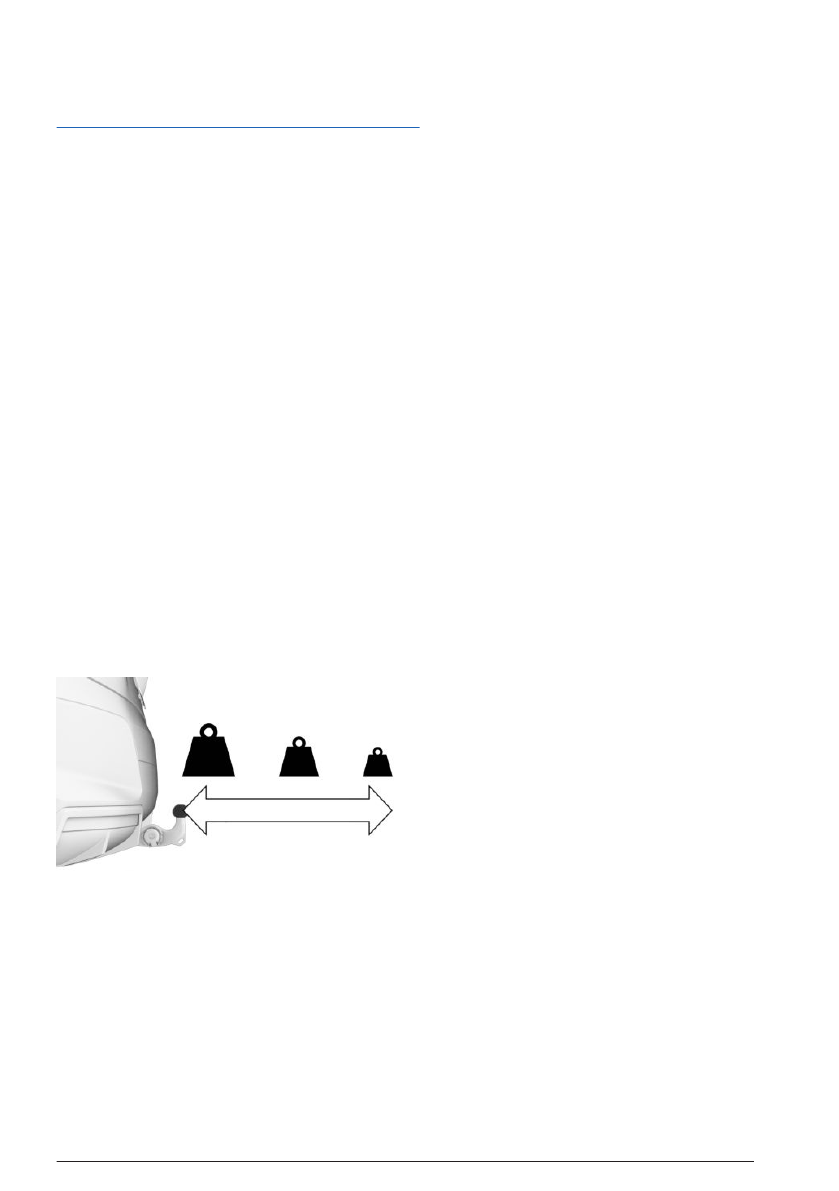
The gross vehicle weight of the loaded rear
carrier depends on how far its center of gravity
is from the ball head.
▷
If the center of gravity is up to 11.8 in-
ches/30 cm from the ball head, the gross
weight of the rear carrier must not exceed
165 lbs/75 kg.
▷
If the center of gravity is 23.5 inches/60 cm
from the ball head, the gross weight of the
rear carrier must not exceed 77 lbs/35 kg.
▷
Stow heavy cargo as close as possible to
the ball head.
▷
Fasten cargo securely to the rear carrier,
making sure it will not slip.
Before driving
Before starting your trip, make sure that the
tail lights on the rear
carrier are working.
The maximum output of the rear carrier tail
lights should not exceed that of the trailer light-
ing.
Activate trailer
towing when necessary in or-
der to prevent functional limitations or mal-
functions of the driver
assistance systems.
Additional information:
▷
Electrical consumption, refer to page
▷
Driving with trailer or rear carrier, refer to
page
.
Driving with a rear carrier
When loaded, rear carriers move the vehicle's
center of gravity, which affects how the vehicle
handles and
steers.
Therefore, note the following when loading
and driving:
▷
Do not exceed the gross axle weight rating
and gross vehicle weight.
▷
Drive cautiously and avoid driving off and
braking with jerky movements or fast cor-
nering.
Trailer and rear carrier
Driving tips
327
Online Edition


