

Set-up and use
Seats, mirrors and steering
wheel
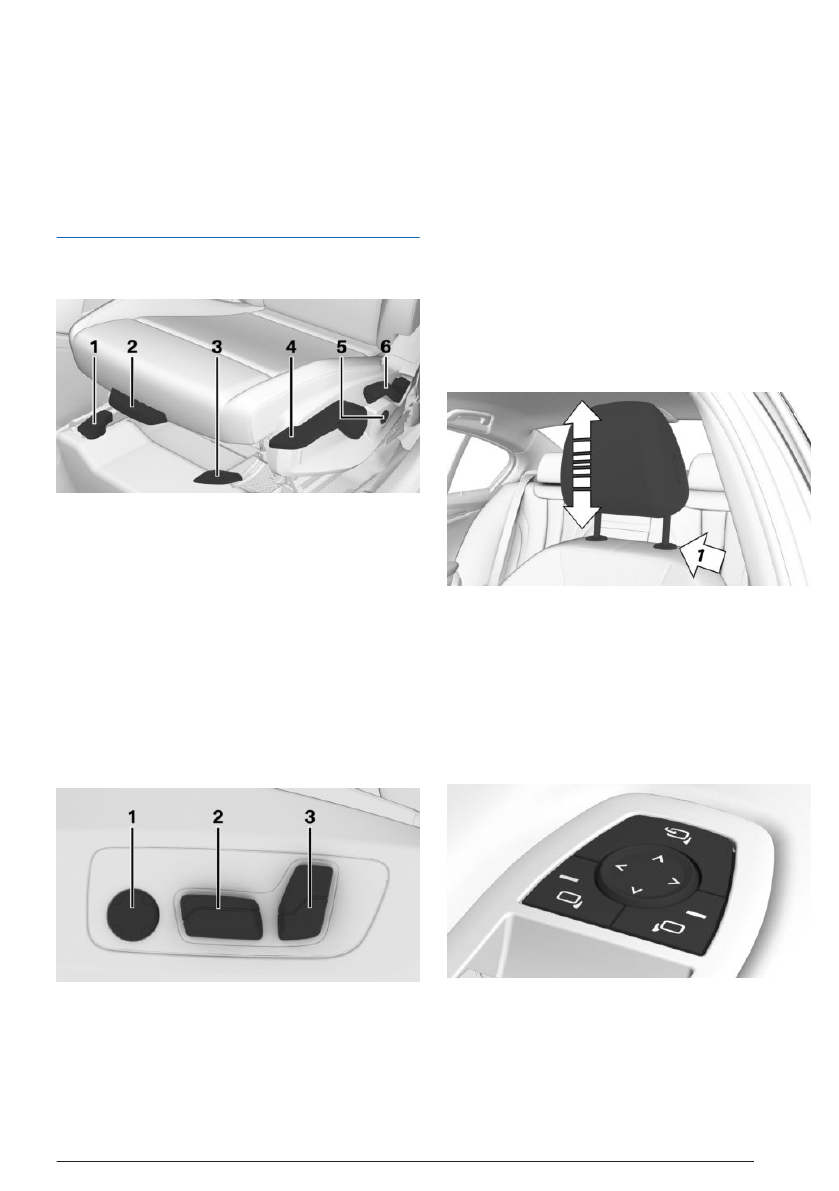
Manually adjustable seats
1
Longitudinal direction
2
Thigh support
3
Seat tilt
4
Height
5
Lumbar support
Depending
vehicle equipment: backrest
width
6
Backrest tilt
Electrically adjustable seats
1
Lumbar support
Depending vehicle equipment: backrest
width
2
Height/longitudinal direction/seat tilt
3
Backrest tilt
Adjusting the head restraint
Adjusting the height
▷
To lower, press the release button on
the backrest, then push the head restraint
downward, arrow 1.
▷
To raise the height of the head restraint,
push the head restraint upward.
Adjusting the exterior mirrors
Set-up and use
Quick reference
19
Online Edition

Mobile phones in range are displayed on
the control display.
2.
Select the desired mobile phone.
3.
Compare the control number shown on the
control display with the control number on
the device display and confirm that they
match.
4.
If necessary, select
connection mode:
"Continue with BMW iDrive"
The device is connected and displayed in the
device list.
Accepting a call
Depending on the equipment, incoming calls
can be answered in several ways.
▷
Via iDrive:
"Accept"
▷
Press the telephone function button
on the steering wheel.
Dialing a number
iDrive can be used to dial a telephone number.
1.
Go through the menu as follows: Apps
menu / "All" / "Telephone" / "Dial".
2.
Enter the desired digits.
3.
Select the icon for calling. The connec-
tion is established via the mobile phone to
which this function has been assigned.
Set-up and use
Quick reference
21
Online Edition


