


In the event of a side collision, the side airbag
in the rear protects the chest and lap area on
the side of the bodies of the occupants in the
outer rear seats.
Head airbag
In the event of a side collision, the head airbag
protects the head.
Ejection Mitigation
The head airbag system is designed as an
ejection mitigation countermeasure to reduce
the likelihood of ejections of vehicle occupants
through side windows during rollovers or side
collision events.
Knee airbag
The availability of the knee airbag depends on
the national-market
version.
The knee airbag protects the legs in the event
of a frontal impact.
Protective effect
General information
Airbags are not deployed in every impact sit-
uation, e.g., not in less severe accidents.
Information on optimum protective ef-
fect of the airbags
WARNING
If the seat position is incorrect, the seat
belts are fastened incorrectly or the deploy-
ment area of the airbags is impaired, the
airbag system cannot provide protection as
intended and may cause additional injuries
due to deployment. There is a risk of injury
and danger to life. Follow the information on
achieving the optimum protective effect of the
airbag system.
To ensure that the airbag system has the opti-
mal protective effect, note the following:
▷
Keep a distance from the airbags.
▷
Fasten seat belts correctly.
▷
Always grasp the steering wheel on the
steering wheel rim. Hold hands at the
3 o'clock and 9 o'clock positions to keep
the risk of injuring hands or arms as low as
possible when the airbag deploys.
▷
Adjust the seat and steering wheel so
that hands can reach over the steering
wheel diagonally. Select the settings so
that when reaching over the steering wheel
the shoulders rest against the backrest and
the upper body is as far away as possible
from the steering wheel.
▷
Make sure that the front passenger is sit-
ting correctly, i.e., with their feet and legs in
the footwell, not resting on the dashboard.
▷
Make sure that occupants keep their heads
away from the side airbag.
▷
There should be no additional persons, an-
imals or objects between an airbag and a
person.
▷
Keep the dashboard and windshield on the
front passenger side clear, i.e., do not cover
with adhesive film or other coating, and do
not attach mounts for, e.g., navigation devi-
ces or mobile phones.
▷
Do not bond the airbag cover panels with
adhesive, do not cover them, and do not
modify them in any way.
▷
Do not use the airbag cover on the front
passenger side for storage.
▷
Keep storage compartments near the air-
bags closed, e.g., glove compartment or
center armrest.
▷
Do not place slip covers, seat cushions,
or other objects on the front seats unless
they are specifically designed for seats with
integrated airbags.
▷
Do not hang pieces of clothing such as
jackets over the backrests.
Safety
Controls
171
Online Edition
Safety information
WARNING
To ensure the front passenger airbag func-
tion, the system must be able to detect
whether a person is sitting in the front pas-
senger seat. The entire seat surface must
be used for this purpose. There is a risk of
injury and danger to life. Make sure that the
front passenger keeps his or her feet in the
footwell.
Functional requirements
To ensure that occupants in the front passen-
ger seat are detected properly, the following
functional requirements must be met:
▷
Do not attach covers, cushions, ball mats
or other items to the front passenger seat
unless they are specifically determined to
be safe for use on the front passenger seat.
▷
Do not place objects under the seat that
can press against the seat from below.
▷
Sit upright in the seat with the back against
the backrest.
▷
Sit down with your feet touching the floor.
Installing child restraint systems
To ensure that occupants on the front passen-
ger seat are detected properly, note the follow-
ing:
▷
When using child restraint systems, pay
close attention to the operating and safety
instructions provided by the child restraint
system manufacturer.
▷
Make sure that the seat surface of the child
restraint system rests as flat as possible on
the seat surface.
▷
Move the head restraint up or remove it to
ensure that the child restraint system rests
as flat as possible against the rear seat
backrest.
▷
Observe the maximum size of the child re-
straint system, for example to avoid possi-
ble touching the roof.
Before transporting a child on the front pas-
senger seat, refer to the safety information
and instructions in the section “Children on the
front passenger
seat”.
Additional information:
Install child restraint systems, refer to page
Indicator light, front passenger air-
bag
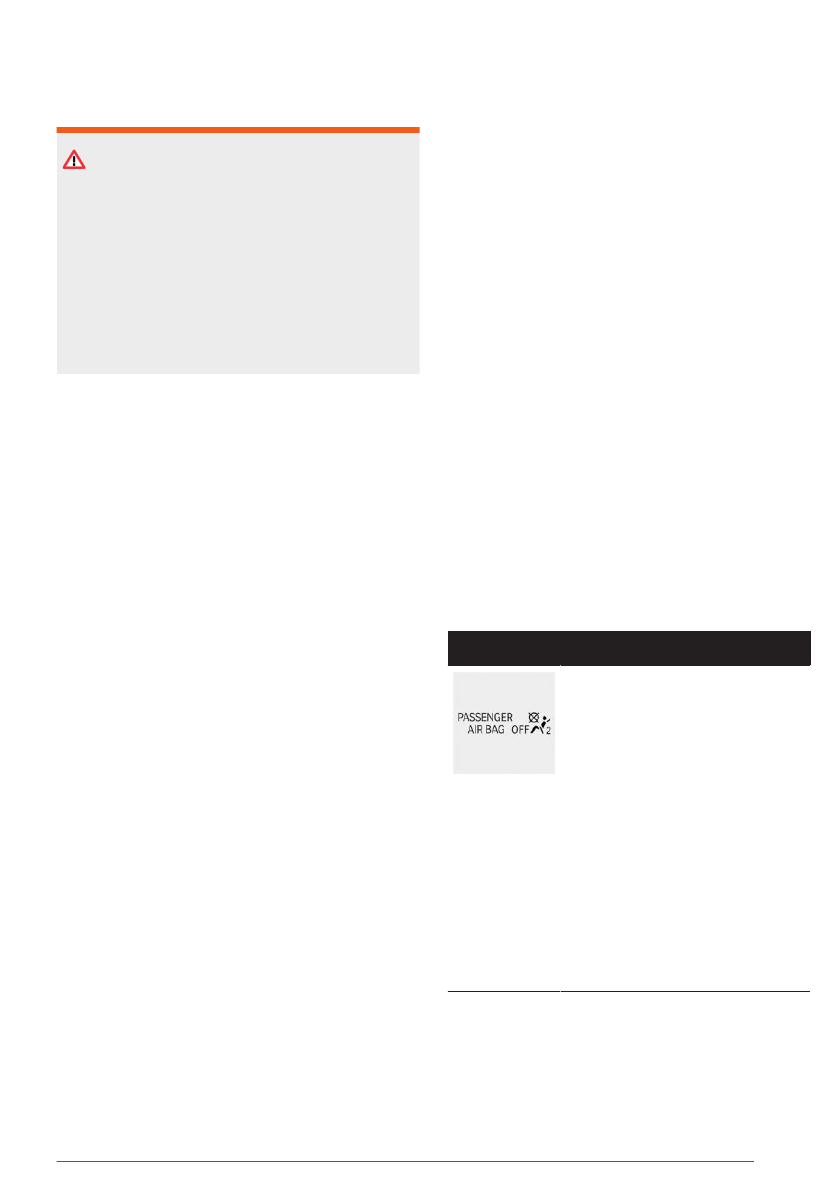
The front passenger airbag indicator light in
the headliner shows the operating state of the
front passenger
airbag.
The indicator light shows whether the airbag is
activated or
deactivated.
After drive-ready state is turned on, the indi-
cator light illuminates briefly and then shows
whether the airbag is activated or deactivated.
Display
Function
The indicator light is contin-
uously illuminated when the
seat is not occupied or when a
child is detected on the seat in
a provided child restraint sys-
tem as intended. The airbag
on the front passenger's side
is not activated.
The
indicator light does not il-
luminate when, for instance, a
correctly seated person of suf-
ficient size is detected on the
seat. The airbag on the front
passenger's side is activated.
When the front passenger seat is occupied,
check the indicator light in the headliner before
and while driving.
Safety
Controls
173
Online Edition

Sensors
Depending on vehicle equipment, the Intelli-
gent Safety systems are controlled by the fol-
lowing sensors:
▷
Camera behind the windshield.
▷
Front radar sensor.
▷
Side radar sensors, front.
▷
Side radar sensors, rear.
Additional
information:
Sensors of the vehicle, refer to page
Activating/deactivating/adjusting In-
telligent Safety systems
1.
To activate/deactivate Intelligent Safety
systems or configure settings, go through
the menu as follows: Apps menu /
"Vehicle" / "Driving settings" / "Driver
Assistance" / "Safety and warnings".
2.
Select the desired settings.
Depending on national-market version, some
Intelligent Safety Systems are automatically
activated whenever you start driving.
Resetting the settings
The settings of the collision warning systems
can be reset to the default settings at vehicle
outbound delivery.
Go
through the menu as follows: Apps
menu / "Vehicle" / "Driving settings" / "Driver
Assistance" / "Safety and warnings" / "Reset
to recommended settings".
System limits
Safety information
WARNING
Because of system limitations, this system
may either not respond, or respond too late,
incorrectly, or without cause. There is a risk
of accident, injury, and property damage. Ac-
tively intervene as warranted. Refer to the in-
formation in this Owner’s Manual regarding
the scope of the system’s operation and limi-
tations.
Detection capability
The detection capability of the collision warn-
ing systems is
limited.
The system only takes into account objects
that are located in the detection range of the
installed sensors and are detected by the sys-
tem.
Depending on the
vehicle equipment, the area
is monitored by cameras or radar sensors.
Thus, a system response might not come or
might come late.
System limits of the sensors
The Intelligent Safety systems may be re-
stricted by the system
limits of the sensors.
Additional information:
Sensors of the vehicle, refer to page
Forward Collision Mitigation
with brake intervention
Principle
Forward Collision Mitigation with brake inter-
vention can help to prevent accidents within a
certain speed range. To do so, the area around
the vehicle is monitored by
various sensors.
If an accident cannot be avoided, the system
can help reduce the severity of the accident.
The system can issue a warning of a possible
risk of collision and activate the brakes inde-
pendently, if needed. You can cancel automatic
brake intervention manually, e.g., by actively
moving the steering
wheel.
Depending on vehicle equipment, the Forward
Collision Mitigation system includes the follow-
ing functions:
Safety
Controls
175
Online Edition
Deactivating the system manually
Depending on national-market version, you
must significantly reduce your vehicle's speed
or stop your vehicle in order to deactivate
the Forward Collision Mitigation manually. For-
ward Collision Mitigation is deactivated via
iDrive.
You may need to
successively confirm deacti-
vation on the control
display.
Go through the menu as follows: Apps
menu / "Vehicle" / "Driving settings" /
"Driver Assistance" / "Safety and warnings" /
"Forward Collision Mitigation" / "Off".
Setting the warning time for For-
ward Collision Mitigation
You can configure the warning time at which
Forward Collision Mitigation should issue a
warning.
1.
Go through the menu as follows:
Apps menu / "Vehicle" / "Driving
settings" / "Driver Assistance" / "Safety and
warnings" / "Forward Collision Mitigation".
2.
Select the desired setting.
The more sensitive the warning time is set to
be, the more warnings will be displayed. The
system can therefore also issue more early or
unfounded warnings and
reactions.
The system checks for visual impairments. De-
pending on the vehicle equipment, the Driver
Attention Camera in the instrument cluster
captures the driver’s field of vision. Visibility
and gaze behavior also affect the timing of
warnings.
Display in the instrument cluster
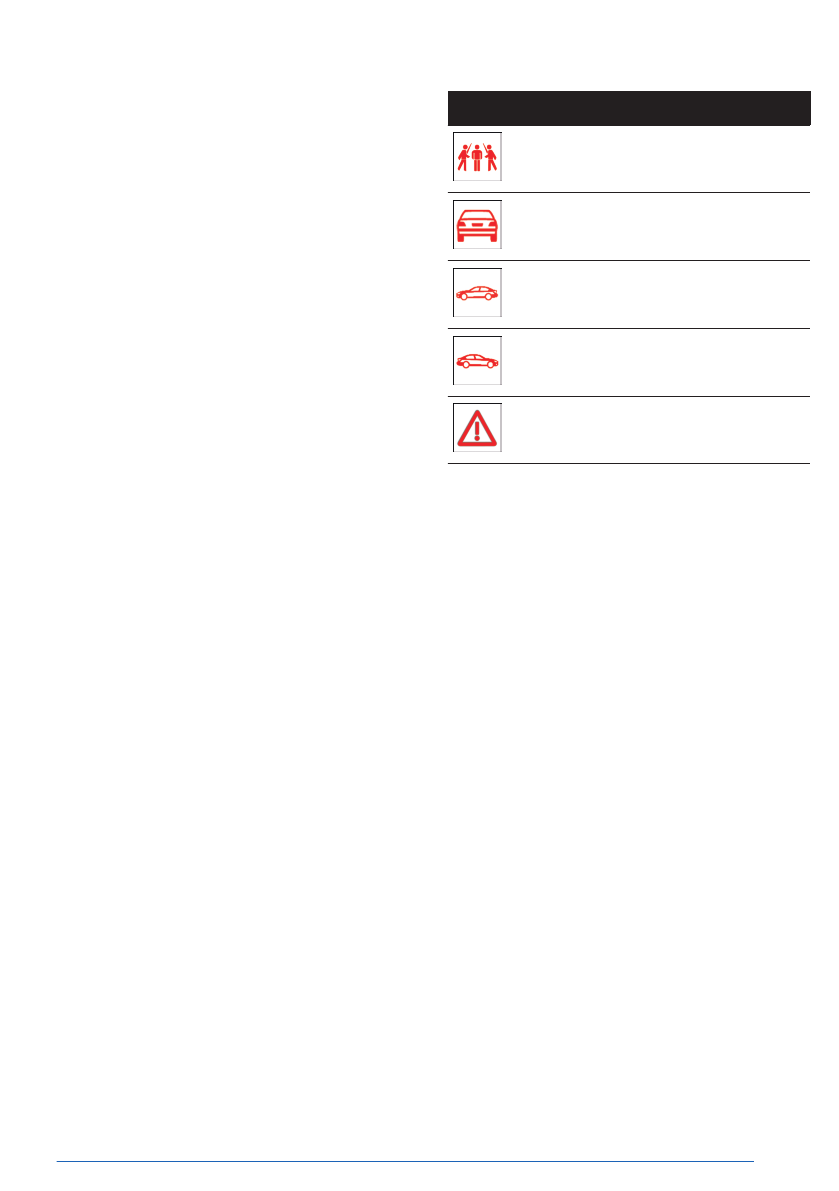
Forward Collision Mitigation is shown on the
instrument cluster and, depending on vehicle
equipment, Head-up display by various indica-
tor lights and warning lights:
Icon
Meaning
Risk of collision with a person, e.g., a
pedestrian.
Risk of collision, for instance with an
oncoming or a vehicle driving ahead.
Risk of collision, e.g., with a vehicle
crossing from the right.
Risk of collision, e.g., with a vehicle
crossing from the left.
General risk of collision.
Indicator lights and warning lights may be
displayed differently since the system has de-
tected multiple objects.
Warning function
The Forward Collision Mitigation warns on dif-
ferent warning levels, depending on the re-
spective hazardous
situation.
In the event of a prewarning, a warning light
illuminates red. In the event of an acute warn-
ing, a warning light flashes red and a warning
tone sounds.
In the
event of a system warning, the driver
must intervene immediately and in accordance
with the situation.
▷
Red warning light
illuminates:
A hazardous situation has been detected.
Increased awareness is required.
▷
Red warning light
flashes:
There is a risk of collision. Intervene imme-
diately.
▷
A warning signal
sounds:
There is a risk of collision. Intervene imme-
diately.
▷
Automatic brake intervention:
Safety
Controls
177
Online Edition

In the event of an accident, the system helps
by reducing impact
speed.
The time of warnings may vary depending on
the current driving
situation.
The system considers the driver’s vehicle han-
dling when responding. If an active driving
style is detected, warnings and brake interven-
tions occur less frequently.
The sensors detect the traffic situation in their
detection range.
Safety information
WARNING
The system cannot serve as a substitute for
the driver’s personal judgment in assessing
the traffic situation. Based on the limits of
the system, it cannot independently react to
all traffic situations. There is a risk of acci-
dent, injury, and property damage. Adjust
driving style to traffic conditions. Watch the
surrounding traffic situation closely, be ready
to take over steering and braking at any time,
and actively intervene where appropriate.
WARNING
Indicators and warnings cannot serve as a
substitute for the driver’s personal judgment.
Due to its limits, the system may not issue
warnings or responses, or these may be is-
sued late or in a manner that is not consis-
tent with their normal use. There is a risk of
accident, injury, and property damage. Adjust
driving style to traffic conditions. Watch sur-
rounding traffic closely and actively intervene
where appropriate.
Speed range
The rear-end collision warning function is acti-
vated when your vehicle speed is greater than
approx. 3 mph/5 km/h.
Display in the instrument cluster
If there is a risk of collision with a detected
vehicle, a warning light is shown on the instru-
ment cluster and Head-up display, depending
on vehicle equipment.
Icon
Meaning
Forward Collision Warning with a de-
tected vehicle.
General risk of collision.
Warning function
The rear-end collision warning function issues
warnings on different levels, depending on
the respective hazard situation. This system
prompts the driver to
intervene manually.
Additional information:
Forward Collision
Mitigation, refer to page
.
System limits
General information
Observe the system limits in Chapter “Forward
Collision Mitigation with Brake Intervention”.
Detection range
With the rear-end collision warning function,
the following may not be detected or may be
detected only with a delay in the detection
range of the sensors, e.g.:
Safety
Controls
179
Online Edition
In case of a possible risk of collision, a brake
intervention is
triggered.
Additional information:
Forward Collision Mitigation, refer
to page
System limits
General information
Observe the system limits in Chapter “Forward
Collision Mitigation with Brake Intervention”.
Detection range
With the oncoming traffic warning function, the
following may not be detected or may be de-
tected only with a delay in the detection range
of the sensors, e.g.:
▷
Oncoming vehicles at a very high speed.
▷
Vehicles with an unusual front view.
Warning function for turning
with oncoming traffic
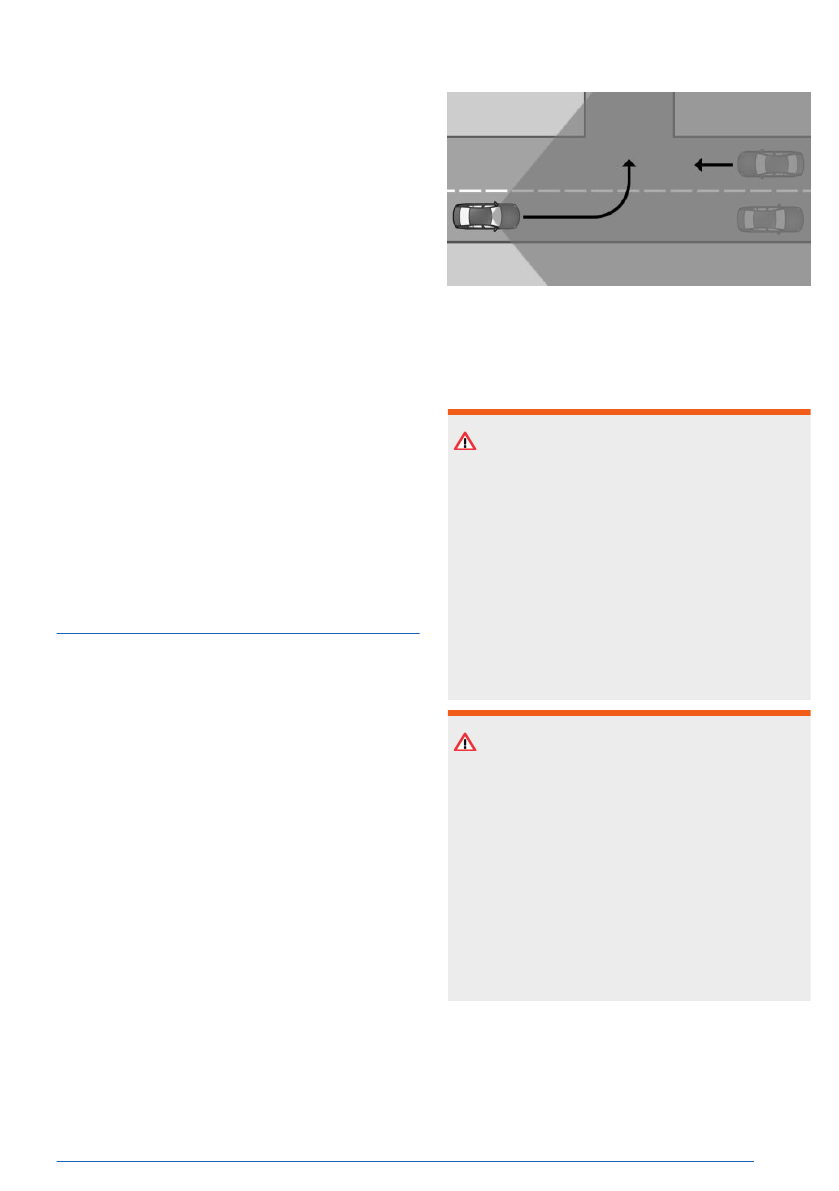
Principle
The warning function for turning with oncom-
ing traffic warns you of a possible risk of col-
lision with oncoming traffic by displaying a
warning light on the instrument cluster. This
system also brakes automatically when nec-
essary. You can cancel automatic brake inter-
vention manually, e.g., by actively moving the
steering wheel.
In the
event of an accident, the system helps
by reducing impact
speed.
The time of warnings may vary depending on
the current driving situation.
The sensors detect the traffic situation in their
detection range.
Safety information
WARNING
The system cannot serve as a substitute for
the driver’s personal judgment in assessing
the traffic situation. Based on the limits of
the system, it cannot independently react to
all traffic situations. There is a risk of acci-
dent, injury, and property damage. Adjust
driving style to traffic conditions. Watch the
surrounding traffic situation closely, be ready
to take over steering and braking at any time,
and actively intervene where appropriate.
WARNING
Indicators and warnings cannot serve as a
substitute for the driver’s personal judgment.
Due to its limits, the system may not issue
warnings or responses, or these may be is-
sued late or in a manner that is not consis-
tent with their normal use. There is a risk of
accident, injury, and property damage. Adjust
driving style to traffic conditions. Watch sur-
rounding traffic closely and actively intervene
where appropriate.
Speed range
The warning function for turning is activated
when your vehicle speed is greater than ap-
prox. 3 mph/5 km/h.
Safety
Controls
181
Online Edition
Safety information
WARNING
The system cannot serve as a substitute for
the driver’s personal judgment in assessing
the traffic situation. Based on the limits of
the system, it cannot independently react to
all traffic situations. There is a risk of acci-
dent, injury, and property damage. Adjust
driving style to traffic conditions. Watch the
surrounding traffic situation closely, be ready
to take over steering and braking at any time,
and actively intervene where appropriate.
WARNING
Indicators and warnings cannot serve as a
substitute for the driver’s personal judgment.
Due to its limits, the system may not issue
warnings or responses, or these may be is-
sued late or in a manner that is not consis-
tent with their normal use. There is a risk of
accident, injury, and property damage. Adjust
driving style to traffic conditions. Watch sur-
rounding traffic closely and actively intervene
where appropriate.
Speed range
The Pedestrian Warning function is activated
when your vehicle speed is greater than ap-
prox.
3 mph/5 km/h.
Depending on vehicle equipment, this system
reacts when your vehicle speed is less than
approx. 50 mph/80 km/h.
Display in the instrument cluster
If there is a risk of collision with a detected
pedestrian or cyclist, a warning light is shown
on the instrument cluster and Head-up display,
depending on vehicle equipment.
Icon
Meaning
Risk of collision with a person, e.g., a
pedestrian.
General risk of collision.
Warning function
The Pedestrian Warning system issues warn-
ings on different levels, depending on the
respective hazard situation. This system
prompts the driver to
intervene manually.
Additional information:
Forward Collision
Mitigation, refer to page
.
System limits
General information
Observe the system limits in Chapter “Forward
Collision Mitigation with Brake Intervention”.
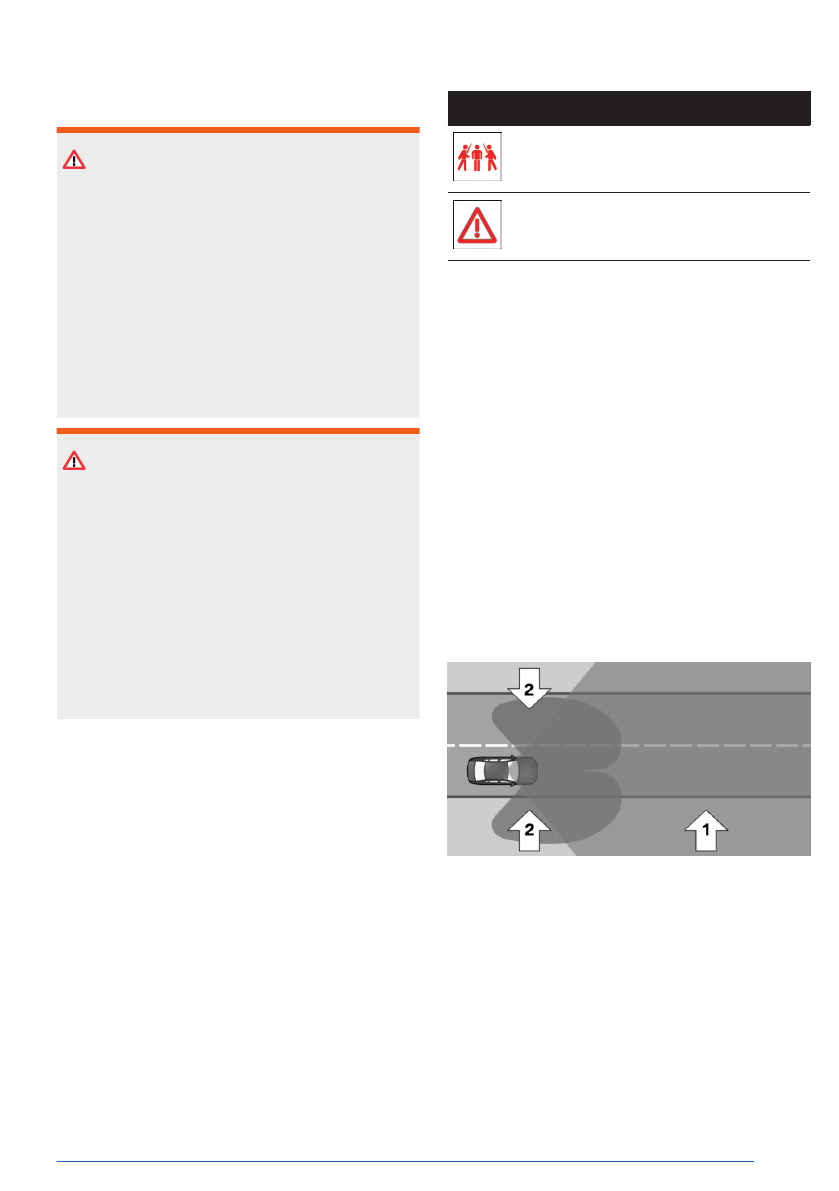
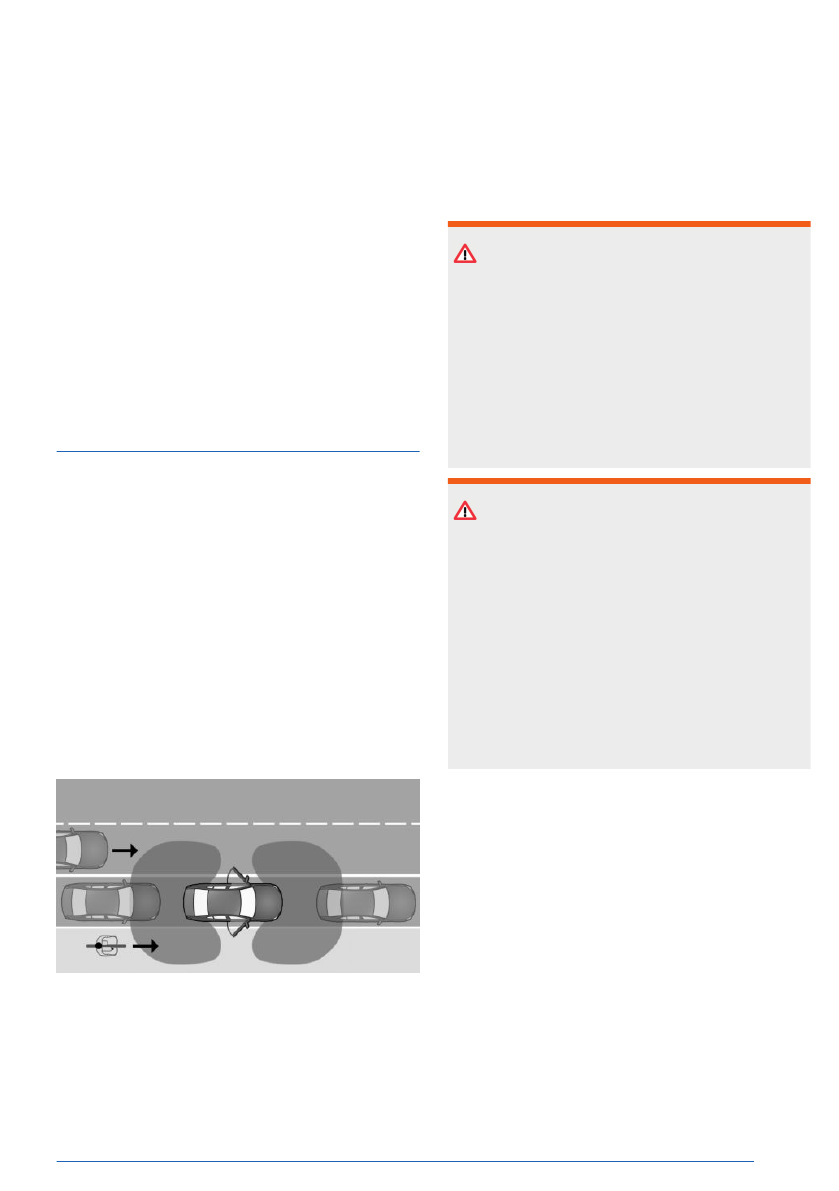
Detection range
With the Pedestrian Warning, the sensor de-
tection range consists of the following:
▷
From area in front of vehicle, arrow 1.
▷
If vehicle is equipped with front side radar
sensors, side areas, arrows 2.
The following situations may not be detected,
for instance:
Safety
Controls
183
Online Edition
The system responds to crossing vehicles
when the vehicle speed is below approx.
50 mph/80 km/h.
Display in the instrument cluster
If there is a risk of collision with a detected
vehicle, a warning light is shown on the instru-
ment cluster and Head-up display, depending
on vehicle equipment.
Icon
Meaning
Risk of collision with vehicle crossing
from the right.
Risk of collision with vehicle crossing
from the left.
General risk of collision.
Warning function
The Intersection Warning system issues warn-
ings on different levels, depending on the
respective hazard. This system prompts the
driver to intervene
manually.
Additional information:
Forward Collision Mitigation, refer to
page
System limits
General information
Observe the system limits in Chapter “Forward
Collision Mitigation with Brake Intervention”.
Detection range
With the Intersection Warning function, the fol-
lowing may not be detected or may be de-
tected only with a delay in the detection range
of the sensors, e.g.:
▷
Crossing vehicles when they are hidden,
e.g. by buildings.
▷
Vehicles with an unusual side view.
▷
Vehicles in highly dynamic driving situa-
tions.
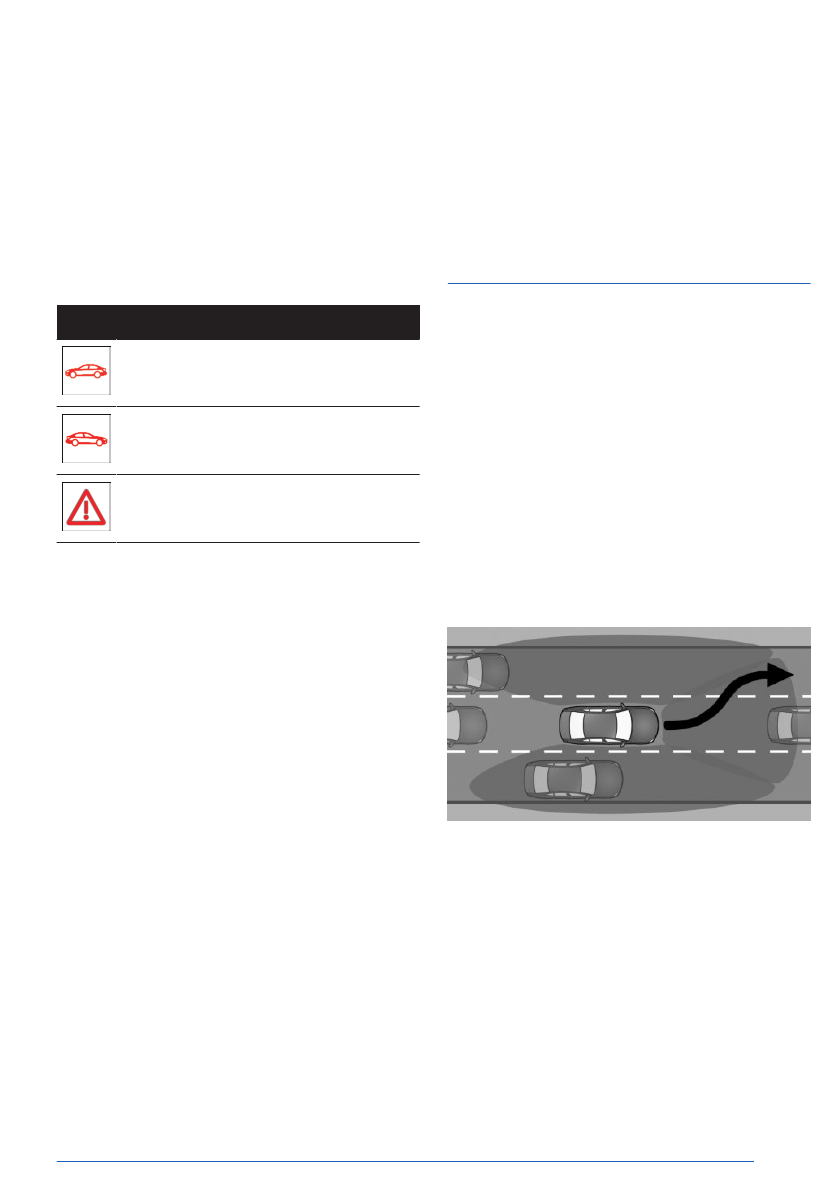
Evasion Assistant
Principle
The Evasion Assistant can help the driver per-
form evasive maneuvers in certain situations,
e.g., when obstacles or pedestrians appear
suddenly. This system intervenes actively to
assist the driver if it is possible to make an
evasive maneuver to the
side.
If the system detects sufficient free space
alongside the vehicle, it helps the driver per-
form an evasive maneuver
safely.
The system warns the driver of a possible risk
of collision by displaying various warning lights
on the instrument cluster.
The sensors monitor and detect the clearance
in front of the vehicle. Depending on the vehi-
cle equipment, the areas next to the vehicle
are also monitored.
Safety
Controls
185
Online Edition
▷
Two-wheeled vehicles ahead of you.
▷
Partially covered pedestrians or bikes.
▷
Pedestrians that are not detected as such
because of their contour or posture.
▷
Pedestrians who are too small for the sen-
sors to detect.
Functional limitation
This system is deactivated when the trailer
power socket is occupied or trailer towing is
activated, e.g., when using a trailer or rear bi-
cycle rack.
Exit Warning
Principle
The Exit Warning helps to
avoid accidents.
The system monitors the vehicle's surround-
ings for a limited time after you get in or park.
When opening doors, vehicle occupants are
then warned if a risk of collision with an ap-
proaching object is
detected.
A possible risk of collision is indicated by var-
ious warnings, e.g., warning light on the exte-
rior mirror and a warning
tone.
The warning light in the exterior mirror gives
warnings at different levels.
The sensors monitor the area behind the vehi-
cle.
Depending on the
vehicle equipment, the area
around the vehicle in front of the vehicle is
monitored as well.
The Exit Warning can be activated or deacti-
vated on the control
display.
This warning function can also be configured.
Safety information
WARNING
The system cannot serve as a substitute for
the driver’s personal judgment in assessing
the traffic situation. Based on the limits of the
system, it cannot independently react to all
traffic situations. There is a risk of accident,
injury, and property damage. Pay attention to
surrounding traffic and react accordingly as
necessary.
WARNING
Indicators and warnings cannot serve as a
substitute for the driver’s personal judgment.
Due to its limits, the system may not issue
warnings or responses, or these may be is-
sued late or in a manner that is not consis-
tent with their normal use. There is a risk of
accident, injury, and property damage. Adjust
driving style to traffic conditions. Watch sur-
rounding traffic closely and actively intervene
where appropriate.
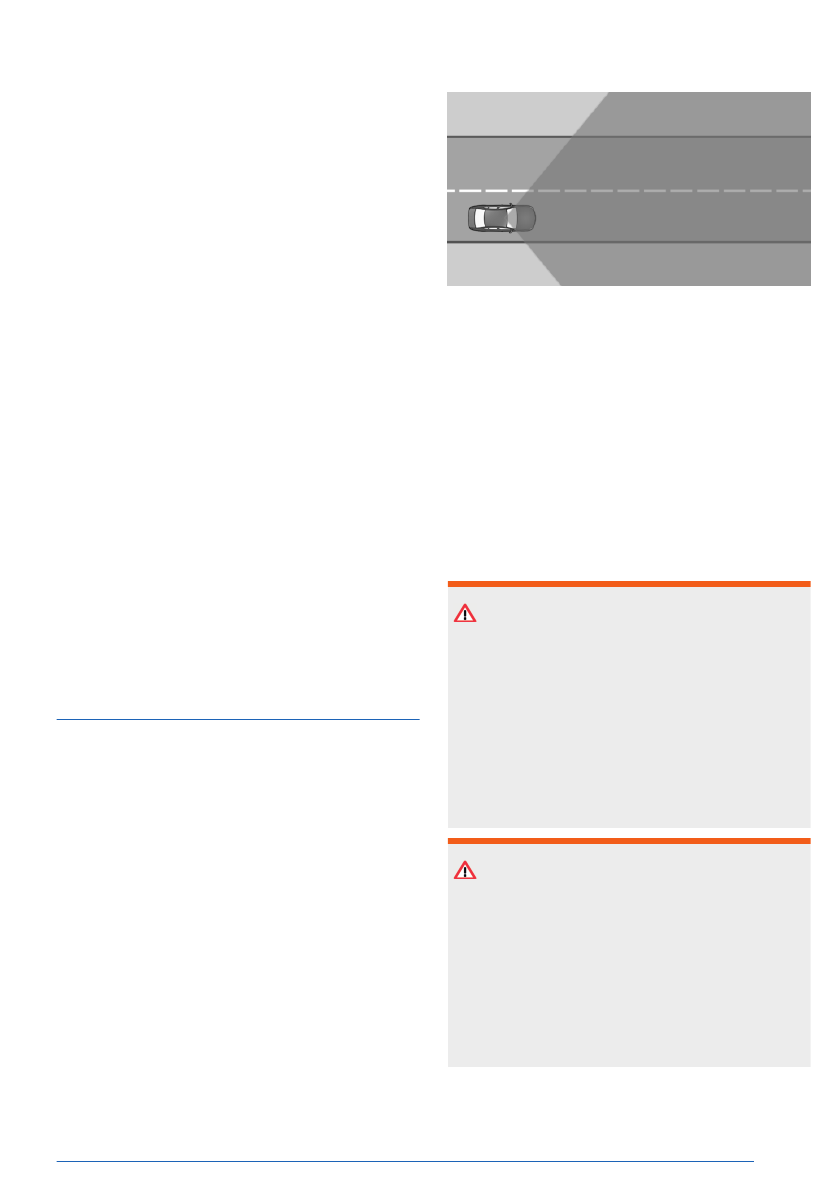
Sensors
The Exit Warning is controlled by the following
sensors:
▷
Side radar sensors, rear.
▷
Depending on whether vehicle is equipped
with side front radar sensors.
Safety
Controls
187
Online Edition
System limits
General information
Follow the system limits in the "Collision warn-
ing systems" chapter.
Detection range
With the Exit Warning, the following may not
be identified in the sensor detection range,
e.g.:
▷
Fully or partially hidden objects.
▷
Stationary or very slow objects.
▷
Pedestrians.
Functional limitations
The Exit Warning may be restricted in the fol-
lowing situations:
▷
The speed of an approaching vehicle is too
fast or too slow.
▷
In curves.
▷
In case of fully or partially hidden objects.
Lane Departure Warning
with Lane Return
Principle
The Lane Departure Warning with Lane Return
alerts the driver when their vehicle is about to
leave the road or
lane.
An automatic steering intervention helps to
keep the vehicle in its lane.
The sensors detect the traffic situation in their
detection range.
The Lane Departure Warning can be activated,
deactivated and set on the
control display.
Various warning functions from this system
help the driver keep their
vehicle in their lane.
If you set your turn signal for the correspond-
ing direction before leaving your lane, no warn-
ings are displayed.
Safety information
WARNING
The system cannot serve as a substitute for
the driver’s personal judgment in assessing
road and traffic situations. There is a risk of
accident, injury, and property damage. Adjust
driving style to traffic conditions. Watch sur-
rounding traffic closely and actively intervene
where appropriate. Do not jerk the steering
wheel in response to a warning.
WARNING
Indicators and warnings cannot serve as a
substitute for the driver’s personal judgment.
Due to its limits, the system may not issue
warnings or responses, or these may be is-
sued late or in a manner that is not consis-
tent with their normal use. There is a risk of
accident, injury, and property damage. Adjust
driving style to traffic conditions. Watch sur-
Safety
Controls
189
Online Edition

Depending on national-market ver-
sion: activate/deactivate steering in-
tervention
Depending on national-market version, the
Lane Departure Warning steering intervention
can be activated or
deactivated.
Go through the menu as follows: Apps
menu / "Vehicle" / "Driving settings" / "Driver
Assistance" / "Safety and warnings" / "Lane
Departure Warning" /
"Steering intervention".
Depending on the national-market version, the
steering intervention is automatically active af-
ter every driving off.
Display in the instrument cluster
Depending on vehicle equipment and national-
market version, different warnings are dis-
played on the instrument cluster for the Lane
Departure Warning.
Icon
Meaning
Indicator light flashes green: System
is actively issuing a warning. If neces-
sary, the system performs a steering
intervention.
Depending on vehicle equipment and national-
market version, information for the system is
displayed in the Assisted View of the instru-
ment cluster.
Additional
information:
Assisted View, refer to page
.
Warning function
General information
Different warnings are issued by the Lane De-
parture Warning system, depending on situa-
tion and speed:
▷
Indicator lights and warning lights on the
instrument cluster.
▷
Vibration of steering wheel.
▷
Steering intervention.
▷
Warning tone.
Steering wheel vibration
If you leave the lane and if a lane boundary
has been detected, the steering wheel vibrates
in accordance with the steering wheel vibration
setting.
Additionally,
a light is displayed on the instru-
ment cluster.
When the
turn signal is switched on in the cor-
responding direction before changing the lane,
a warning is not issued.
Steering intervention
Depending on vehicle equipment and national-
market version: The Lane Departure Warning
system may intervene with an active steer-
ing intervention in addition to vibration if
you cross a lane boundary at speeds up to
130 mph/210 km/h. The system supports the
driver in keeping the vehicle within the lane.
The steering intervention can be noticed on
the steering wheel and can be manually over-
ridden at any
time.
During an active steering intervention, a light is
displayed on the instrument
cluster.
For instance, the steering intervention will be
suppressed in the following situations:
▷
With hard accelerating or braking.
▷
When flashing.
▷
With hazard warning system switched on.
▷
In driving situation with high driving dynam-
ics.
▷
While Dynamic Stability Control regulates
driving stability.
▷
While Dynamic Stability Control is limited.
▷
Immediately following a steering interven-
tion by the vehicle systems.
Safety
Controls
191
Online Edition
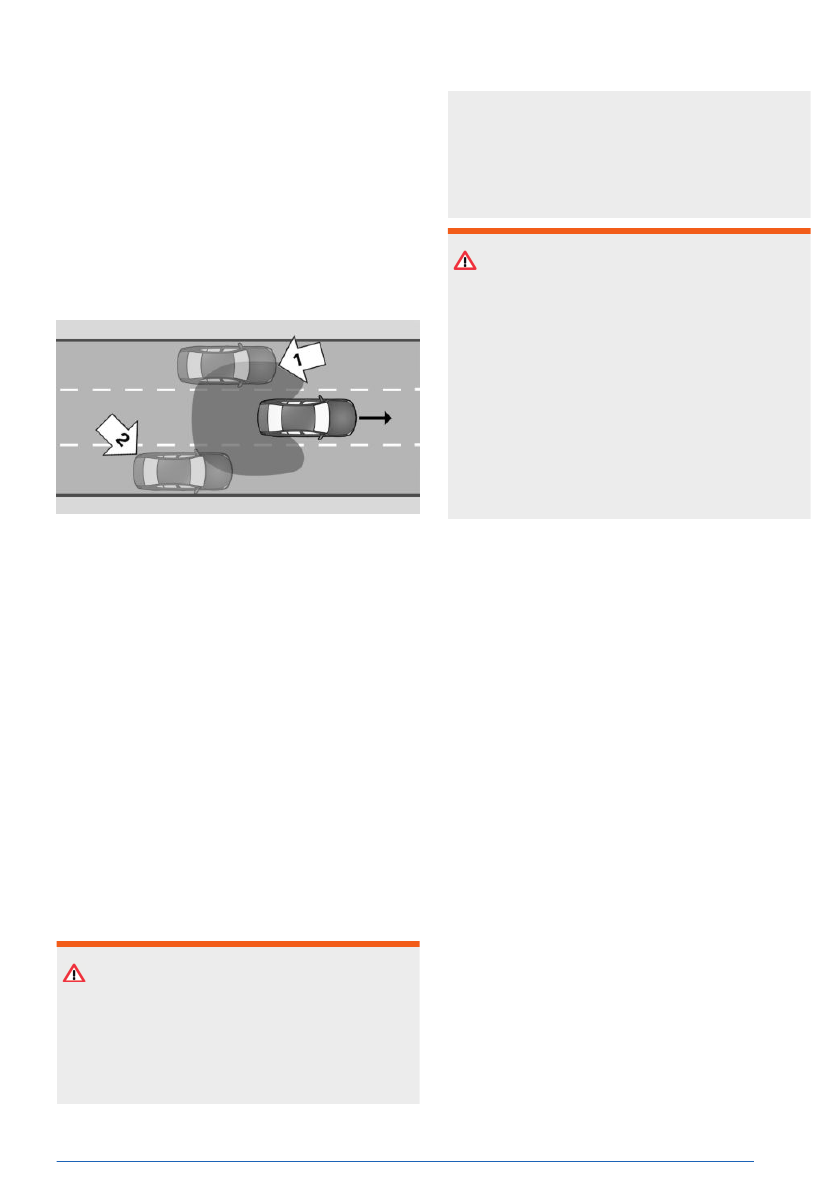
cles approaching from behind in the adjacent
lane.
Objects are also
detected when turning, de-
pending on vehicle
equipment.
An automatic steering intervention helps to
keep the vehicle in its
lane.
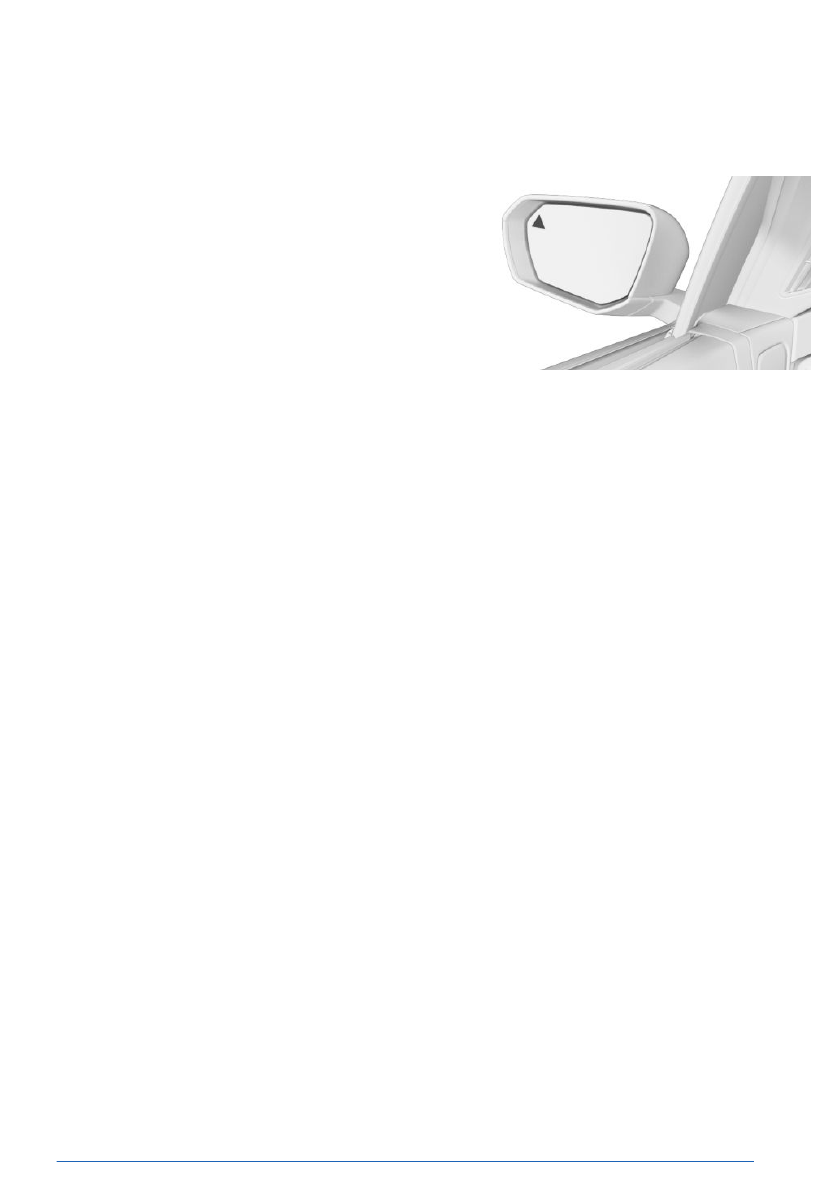
A possible risk of collision is indicated by vari-
ous warnings, e.g., signaled by warning light
on the exterior mirror.
The sensors monitor the area behind and next
to the vehicle.
The
system indicates whether there are vehi-
cles in your blind spot, arrow 1, or approaching
from behind in an adjacent lane, arrow 2. The
warning light in the exterior mirror illuminates
dimly.
The system will
warn in the previously named
situations prior to a lane change. The warn-
ing light in the exterior mirror flashes. When
changing lanes, the steering wheel also vi-
brates at the set intensity.
Active Blind Spot Detection can be activated,
deactivated, and configured on the control dis-
play.
Safety information
WARNING
The system cannot serve as a substitute for
the driver’s personal judgment in assessing
the traffic situation. Based on the limits of
the system, it cannot independently react to
all traffic situations. There is a risk of acci-
dent, injury, and property damage. Adjust
driving style to traffic conditions. Watch the
surrounding traffic situation closely, be ready
to take over steering and braking at any time,
and actively intervene where appropriate.
WARNING
Indicators and warnings cannot serve as a
substitute for the driver’s personal judgment.
Due to its limits, the system may not issue
warnings or responses, or these may be is-
sued late or in a manner that is not consis-
tent with their normal use. There is a risk of
accident, injury, and property damage. Adjust
driving style to traffic conditions. Watch sur-
rounding traffic closely and actively intervene
where appropriate.
Sensors
Active Blind Spot Detection is controlled by the
following sensors:
▷
Camera behind the windshield.
▷
Side radar sensors, rear.
▷
Depending on whether vehicle is equipped
with side front radar sensors.
Speed range
Active Blind Spot Detection is activated when
your vehicle exceeds a given minimum speed.
The minimum speed is country-specific and
displayed in the Active Blind Spot Detection
menu.
When turning at a
speed of up to approx.
12 mph/20 km/h, the steering wheel will not
vibrate.
This system is
temporarily deactivated
at speeds greater than approx.
155 mph/250 km/h.
If
the vehicle speed falls below approx.
155 mph/250 km/h, the system is reactivated.
Safety
Controls
193
Online Edition

An acute warning is issued if the following con-
ditions are met:
▷
Another vehicle is located in the critical
area.
▷
Your own vehicle is approaching the other
lane.
▷
Depending on the system setting when the
turn signal is turned on.
The warning stops when the other vehicle has
left the critical area.
Steering intervention
Depending on national-market version: The
Active Blind Spot Detection system may per-
form an active steering intervention when
there is no response to the steering wheel
vibration and a lane boundary is crossed at
speeds of up to 130 mph/210 km/h. The steer-
ing intervention helps return the vehicle into
the lane. The steering intervention can be no-
ticed on the steering wheel and can be man-
ually overridden at any
time.
The steering intervention is carried out from
a minimum speed. The minimum speed is dis-
played on the control display.
With trailer towing
No steering intervention is performed when the
trailer power socket is occupied or trailer tow-
ing is activated. Active Blind Spot Detection
does not issue a
pre-warning.
Depending on vehicle equipment and national-
market version, an acute warning will continue
to be issued if there is a
risk of collision.
The warning function may be restricted. Warn-
ings can be displayed late or not at all, e.g., if
the speed of the approaching vehicle is much
higher than your own speed. An increased
number of unwarranted warnings may occur.
A Check Control message is displayed on the
instrument cluster.
Warning light flashing
As a self-test of Active Blind Spot Detection,
the warning light on the exterior mirror flashes
briefly when the vehicle is unlocked.
System limits
General information
Follow the system limits in the "Collision warn-
ing systems" chapter.
Functional limitations
The Active Blind Spot Detection may be re-
stricted in the following situations:
▷
When a vehicle is approaching at a speed
much faster than your own.
▷
In tight corners or on narrow roads.
▷
The bumper is dirty, iced up or covered,
for instance by stickers.
Depending on the national-market version, the
steering intervention e.g. in the following situa-
tions:
▷
In the event of missing, worn, poorly visible,
merging, diverging, or multiple lane boun-
daries such as in construction areas.
▷
With lane boundaries that are covered in
snow, ice, dirt or water.
▷
With lane boundaries that are not white.
▷
With lane boundaries that are covered by
objects.
▷
When driving very close to the vehicle in
front of you.
▷
If the camera is impaired.
▷
Up to 10 seconds after turning on drive-
ready state using the Start/Stop button.
A Check Control message may be displayed
on the instrument cluster when this system is
not functioning properly. A yellow warning light
also illuminates on the instrument cluster, de-
pending on national-market
version.
This system may be restricted or deactivated
when the trailer power socket is occupied or
Safety
Controls
195
Online Edition
Sensors
The Side Collision Protection is controlled by
the following sensors:
▷
Camera behind the windshield.
▷
Side radar sensors, front.
▷
Side radar sensors, rear.
Activating/deactivating the Side Col-
lision Protection
1.
To activate/deactivate the Side Collision
Protection, go through the menu as fol-
lows: Apps menu / "Vehicle" / "Driving
settings" / "Driver Assistance" / "Safety and
warnings" / "Side Collision Protection".
2.
Select the desired setting.
Setting the intensity of the steering
wheel vibration
1.
To adjust the steering wheel vibration
intensity, go through the menu as fol-
lows: Apps menu / "Vehicle" / "Driving
settings" / "Driver Assistance" / "Feedback
via steering wheel" / "Vibration intensity".
2.
Select the desired setting.
The setting is applied to all collision warning
systems.
Display in the instrument cluster
Depending on vehicle equipment and national-
market version, Side Collision Protection infor-
mation is displayed in the Assisted View on the
instrument
cluster.
Additional information:
Assisted View, refer to page
.
Warning function
Warning light in exterior mirror
The warning light in the exterior mirror warns
of a possible collision with a detected vehicle.
Acute warning
In the event of an acute warning of the Side
Collision Protection, the warning light on the
exterior mirror flashes and the steering wheel
begins to vibrate if there
is a risk of collision.
A Check Control message is displayed on the
instrument cluster at the same time.
Steering intervention
Depending on the national-market version,
if necessary, the system engages the active
steering intervention to prevent a collision and
maintain the vehicle within its own lane. The
steering intervention can be noticed on the
steering wheel and can be manually overrid-
den at any time.
System limits
General information
Follow the system limits in the "Collision warn-
ing systems" chapter.
Functional limitations
The Side Collision Protection may be restricted
in the following situations:
Safety
Controls
197
Online Edition

Sensors
The Rear-End Collision Preparation is control-
led by the side, rear radar sensors.
Activating/deactivating the Rear-
End Collision Preparation
The Rear-End Collision Preparation is auto-
matically activated whenever
you start driving.
The system is deactivated in the following sit-
uations:
▷
When reversing.
▷
When the trailer power socket is occupied
or trailer towing is activated, e.g., when us-
ing a trailer or rear bicycle rack.
System limits
General information
Follow the system limits in the "Collision warn-
ing systems" chapter.
Functional limitations
The Rear-End Collision Preparation may be re-
stricted if the speed of the approaching vehicle
is much higher or similar to your own speed.
Traffic Light and Sign Warn-
ing
Principle
The Traffic Light and Sign Warning provides
support in situations in which the right-of-way
needs to be yielded based on road signs or
traffic lights.
This
system uses a camera to analyze traffic
signs and traffic lights. The navigation system
directs information on the road layout to the
system.
For warning
purposes, the respective traffic sit-
uation, for example, is displayed on the instru-
ment cluster. An acoustic signal also sounds in
acute warning
situations.
A warning is given if the right of way is about
to be violated, e.g., in the following traffic situa-
tions:
▷
At an intersection.
▷
At a road entrance.
▷
On a highway entrance ramp.
▷
At a roundabout.
▷
With a red traffic light.
The Traffic Light and Sign Warning can be ac-
tivated or deactivated on the control display.
You can also configure the warning time.
Safety information
WARNING
The system cannot serve as a substitute for
the driver’s personal judgment in assessing
the traffic situation. Based on the limits of
the system, it cannot independently react to
all traffic situations. There is a risk of acci-
dent, injury, and property damage. Adjust
driving style to traffic conditions. Watch the
surrounding traffic situation closely, be ready
to take over steering and braking at any time,
and actively intervene where appropriate.
WARNING
Indicators and warnings cannot serve as a
substitute for the driver’s personal judgment.
Due to its limits, the system may not issue
warnings or responses, or these may be is-
sued late or in a manner that is not consis-
tent with their normal use. There is a risk of
accident, injury, and property damage. Adjust
driving style to traffic conditions. Watch sur-
rounding traffic closely and actively intervene
where appropriate.
Safety
Controls
199
Online Edition
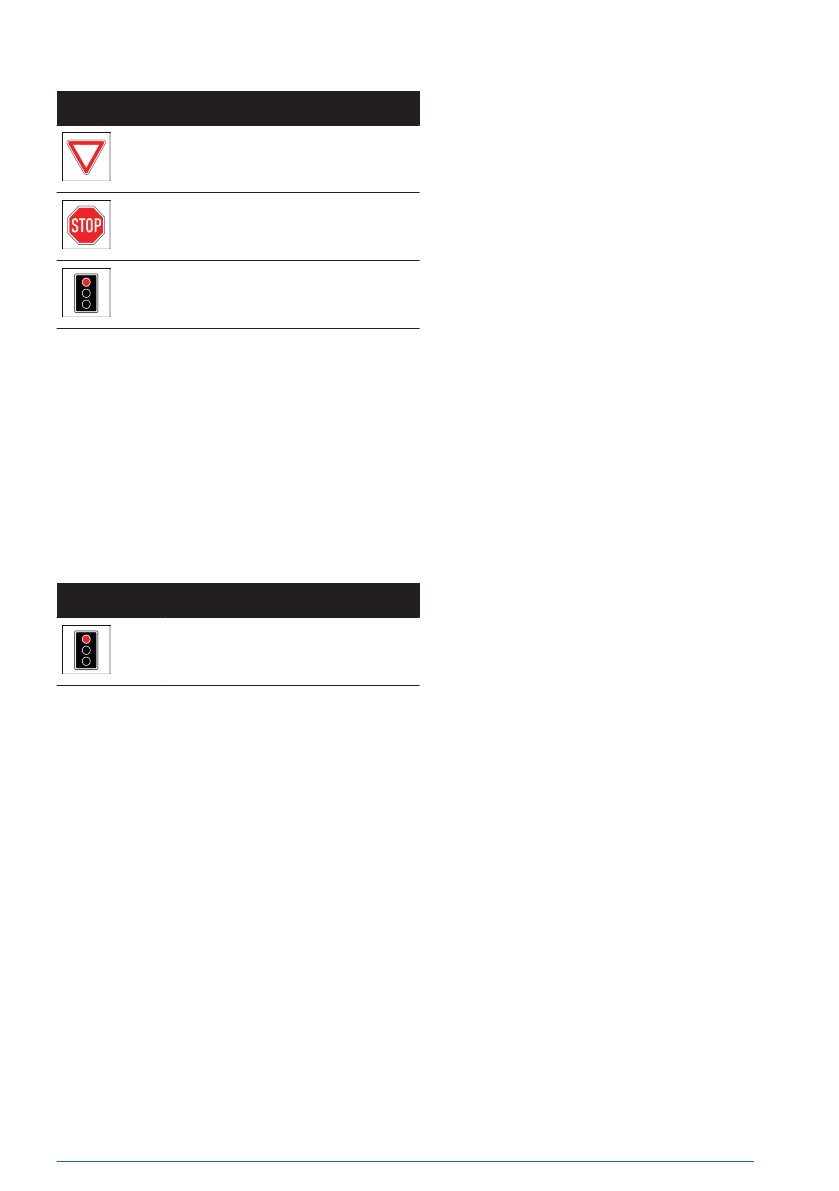
Icon
Meaning
Give way.
Stop.
Red traffic light.
When a prewarning is issued, intervene as
appropriate for the situation; for example, by
braking.
Acute warning
If an acute warning is issued for the Traffic
Light and Sign Warning because there is a risk
that a vehicle is not yielding the right-of-way, a
signal tone sounds and an icon is displayed on
the instrument cluster:
Icon
Meaning
Red traffic light.
When an acute warning is issued, intervene as
appropriate for the situation; for example, by
braking.
Display in the Head-up display
Depending on vehicle equipment, the Traffic
Light and Sign Warning is displayed simulta-
neously on the Head-up display and instru-
ment cluster.
System limits
General information
Follow the system limits in the "Collision warn-
ing systems" chapter.
No warning
The Traffic Light and Sign Warning does not
issue a warning in the following situations, for
example:
▷
In right-of-way situations without right-of-
way signs, stop signs, or red light signal
systems.
▷
With intersections with relevant traffic lights
that are illuminated yellow or green.
Functional limitations
The Traffic Light And Sign Warning system
may be limited in the following situations:
▷
If road signs or light signal systems are un-
clear.
▷
If traffic signs or light signal systems are
fully or partially concealed or soiled.
▷
If traffic signs or light signal systems are
difficult to read or rotated.
▷
If traffic signs or light signal systems are
too small or too large.
▷
If the traffic signs do not correspond to the
standard.
▷
When traffic signs are detected that apply
to a junction or parallel street.
▷
In the presence of country-specific road
signs or road layouts.
▷
With intersections with flashing light signal
systems.
▷
Up to 10 seconds after turning on drive-
ready state using the Start/Stop button.
▷
In the case of navigation data that is inva-
lid, outdated or not available.
▷
In some regions, the system may not be
available or only partially available.
Safety
Controls
201
Online Edition

Functional limitations
The Wrong Way Warning may be restricted in
the following situations, for example, and will
either output an incorrect wrong way warning
or no warning at all:
▷
When the signage is not clear.
▷
If the traffic signs are fully or partially con-
cealed or soiled.
▷
If the traffic signs are poorly legible or ro-
tated.
▷
If the traffic signs are too small or too large.
▷
If the traffic signs do not correspond to the
standard.
▷
When traffic signs are detected that apply
to a junction or parallel street.
▷
In the presence of country-specific road
signs or road layouts.
▷
Up to 10 seconds after turning on drive-
ready state using the Start/Stop button.
▷
In the case of navigation data that is inva-
lid, outdated or not available.
▷
It may not be possible to use the system in
all regions.
No Turn on Red Information
Principle
The No Turn on Red Information assists the
driver by indicating at which traffic lights turn-
ing on red is
prohibited.
To do so, this function analyzes traffic lights
and traffic signs using the camera behind the
windshield. In addition, the navigation system
data is used.
Safety information
WARNING
The system cannot serve as a substitute for
the driver’s personal judgment in assessing
the traffic situation. Based on the limits of
the system, it cannot independently react to
all traffic situations. There is a risk of acci-
dent, injury, and property damage. Adjust
driving style to traffic conditions. Watch the
surrounding traffic situation closely, be ready
to take over steering and braking at any time,
and actively intervene where appropriate.
WARNING
Indicators and warnings cannot serve as a
substitute for the driver’s personal judgment.
Due to its limits, the system may not issue
warnings or responses, or these may be is-
sued late or in a manner that is not consis-
tent with their normal use. There is a risk of
accident, injury, and property damage. Adjust
driving style to traffic conditions. Watch sur-
rounding traffic closely and actively intervene
where appropriate.
Functional requirements
To use the No Turn on Red Information
function, the following functional requirements
must be met:
▷
The system detects the right-of-way situa-
tion ahead by analyzing traffic lights and
traffic signs.
▷
Vehicle is less than approx. 164 ft/50 m
from the traffic lights.
▷
Depending on vehicle equipment, the Traf-
fic Light and Sign Warning is activated.
Sensors
The No Turn on Red Information is controlled
by the camera behind the windshield.
Safety
Controls
203
Online Edition

Triggering the Emergency Stop As-
sistant
If the Emergency Stop Assistant detects that
the driver is no longer driving their vehicle
safely or is ignoring warnings, the system is
triggered automatically. The triggered system
is displayed in the
instrument cluster.
An immediate emergency call can be triggered
on the control
display.
The following is performed automatically when
the Emergency Stop Assistant is triggered:
▷
A display is shown on the instrument clus-
ter.
▷
This system maneuvers the vehicle until it
comes to a standstill.
▷
The hazard warning system is switched on.
▷
An emergency call is triggered when sta-
tionary, depending on vehicle equipment.
▷
The Head-up display may turn off while an
emergency call is ongoing.
The Emergency Stop Assistant can also be
triggered via voice
input.
Additional information:
BMW Intelligent Personal Assistant, refer to
.
Canceling Emergency Stop Assis-
tant
The driver can cancel the Emergency Stop As-
sistant at any point by taking active control of
driving the vehicle.
The
system is stopped by the following ac-
tions, for example:
▷
By firmly pressing the accelerator pedal.
▷
By stopping the system on the control dis-
play.
▷
By operating the turn signal.
▷
By turning off the hazard warning system.
▷
By firmly countersteering.
▷
By changing the selector lever position
when the vehicle was already at a stand-
still.
At standstill
As soon as the vehicle is stationary, the Emer-
gency Stop Assistant will apply the following
settings:
▷
The vehicle is secured against rolling away.
▷
The interior lights are switched on.
▷
The central locking system is unlocked.
Display in the instrument cluster
When triggered, the Emergency Stop Assistant
is shown on the instrument cluster.
Icon
Meaning
The Emergency Stop Assistant has
triggered.
System limits
The Emergency Stop Assistant does not re-
lease the driver from their obligation to drive
safely in traffic.
This
system may be restricted in the following
situations:
▷
When the Driver Attention Camera is cov-
ered by the steering wheel.
▷
When wearing sunglasses with high protec-
tion against infrared light.
Cross Traffic Warning with
brake intervention
Principle
The Cross Traffic Warning with brake interven-
tion helps the driver by providing visual and
acoustic warnings when driving through con-
Safety
Controls
205
Online Edition
Turning off the cross traffic warning
automatically
The Cross Traffic Warning switches off auto-
matically in the following situations, for exam-
ple:
▷
When walking speed is exceeded.
▷
When a certain distance covered is ex-
ceeded.
Warning function
General information
With the Cross Traffic Warning, the control dis-
play shows the corresponding view, an acous-
tic signal may sound, and the warning light on
the exterior mirror
flashes.
In case of a brake intervention, a message is
displayed on the control display and close after
a brief period of time.
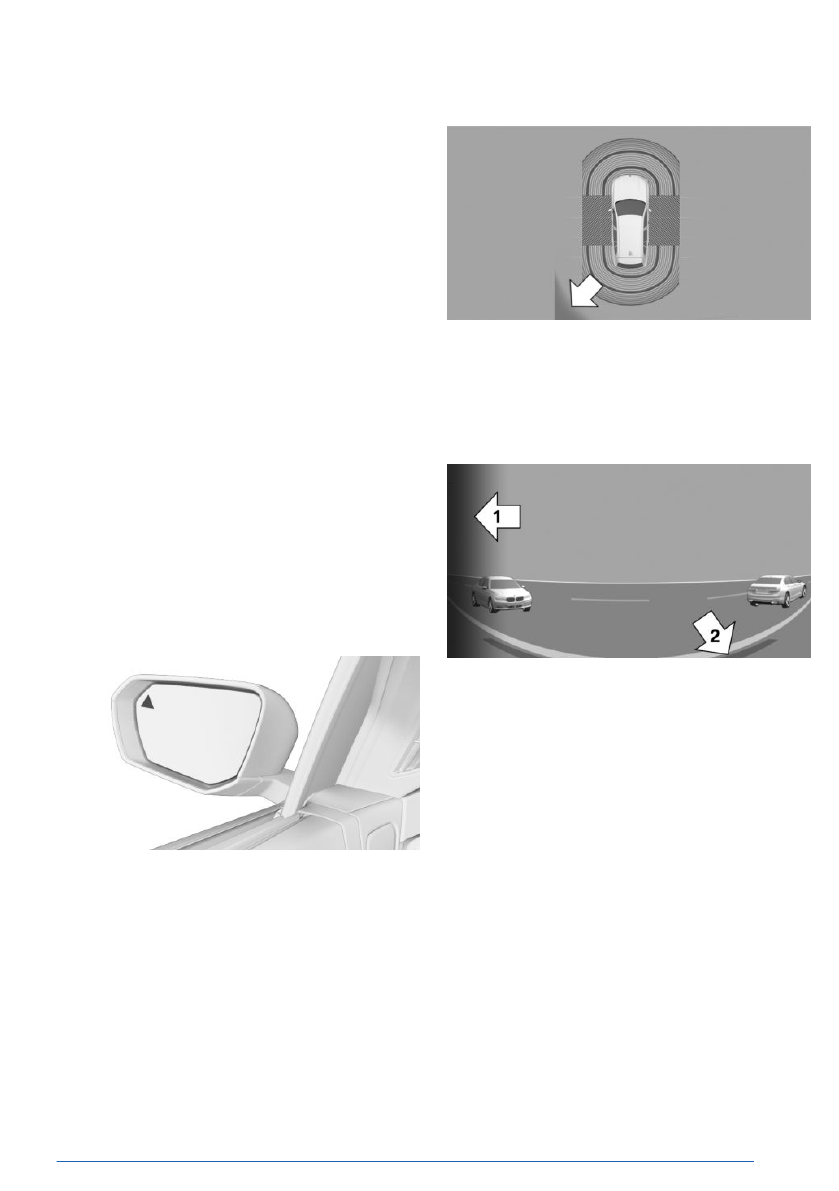
Visual warning
Warning light in exterior mirror
The warning light in the exterior mirror flashes
if the rear sensors detect other vehicles when
the vehicle is reversing.
Display in the Park Distance Control view
In the Park Distance Control view, the respec-
tive boundary area flashes red if vehicles are
detected by the sensors.
Display in camera view
Depending on the direction of travel, the view
to the front or back is displayed in the camera
image.
The boundary
area in the camera image
flashes red if vehicles are detected by the sen-
sors, arrow 1.
Yellow
lines mark the bumper of your own ve-
hicle, arrow 2.
Acoustic warning
In addition to the visual warning of the Cross
Traffic Warning function, an acoustic signal
sounds if your vehicle moves in the corre-
sponding
direction.
Depending on the national-market version, the
signal tone will already sound when the gear
position is engaged.
Safety
Controls
207
Online Edition
be verified in regular intervals, especially when
borders are frequently
crossed.
Other drivers of the vehicle must be informed
about the system. In addition, you should in-
form others about the system when giving
them the vehicle.
Functional requirements
To use the BMW Drive Recorder, the following
functional requirements must be met:
▷
Standby or drive-ready state is on.
▷
The BMW Drive Recorder is activated.
▷
The Privacy Policy has been accepted.
▷
Depending on vehicle equipment, the use
of cameras and GPS coordinates has been
accepted in the Privacy menu.
▷
The recording type has been selected.
▷
The recording duration has been selected.
To use the Theft Alert, the following functional
requirements must be met:
▷
The theft notification was activated in the
Data Protection menu or in the Drive Re-
corder menu.
▷
Data transfer is activated.
▷
The My BMW App is installed on the mobile
device.
▷
The My BMW app is linked to the Connect-
edDrive account.
▷
The Privacy Policy has been accepted.
Activating/deactivating the BMW
Drive Recorder
You must activate the BMW Drive Recorder on
the control display before using the recording
function for the first time.
1.
Go through the menu as follows: Apps
menu / "All" / "Drive Recorder".
2.
Accept the Privacy Policy.
3.
"Settings"
4.
"Allow recordings"
5.
Select the desired setting.
Recording functions
Starting/stopping an automatic re-
cording
If the vehicle sensors detect an accident or
theft, the BMW Drive Recorder starts recording
automatically and then saves this recording.
▷
In the event of an accident, the BMW Drive
Recorder saves recordings up to 30 sec-
onds before and after storage is triggered.
▷
In the event of theft, the BMW Drive Re-
corder saves recordings after being trig-
gered. Recordings are stored depending on
the setting selected for
recording duration.
When the alarm system is triggered, a mes-
sage is sent to the My BMW
App.
After saving the recording, the reduced
quality video can be downloaded to a mo-
bile device.
If the vehicle accelerates rapidly, an automatic
recording may be taken.
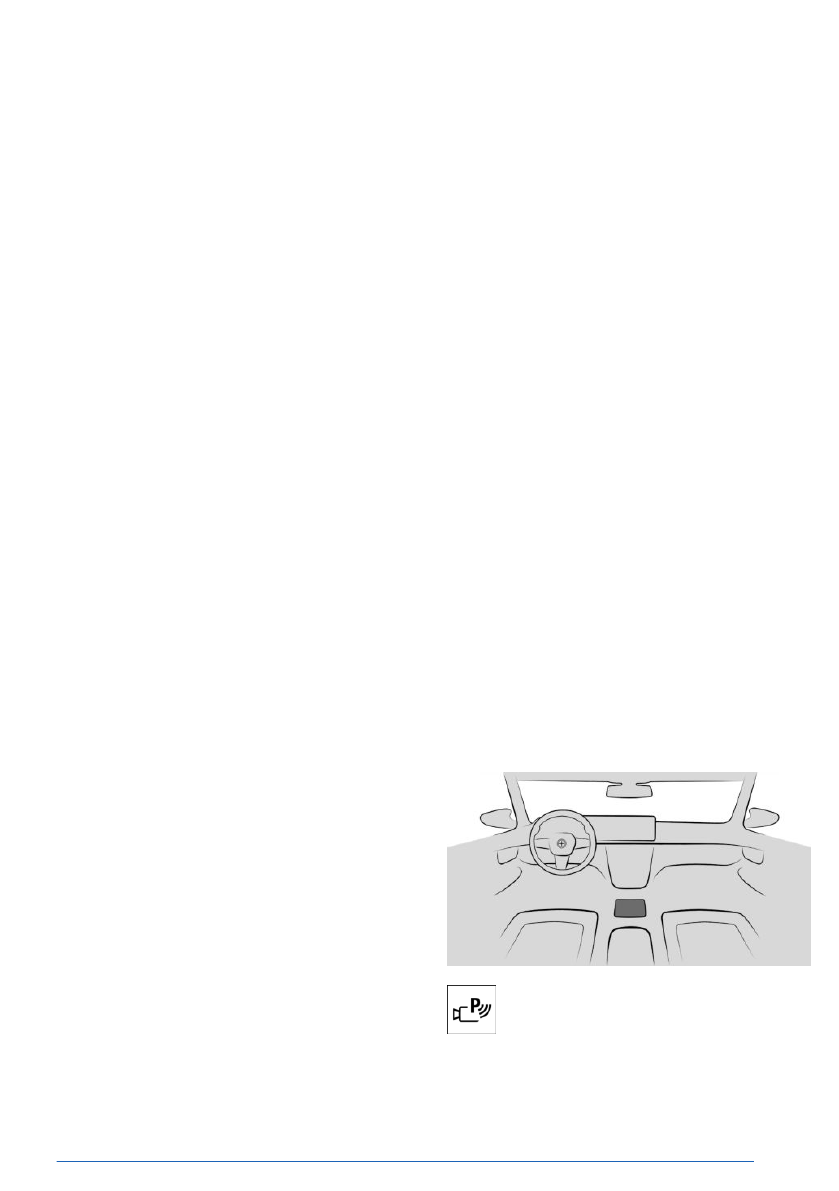
Starting/stopping manual recording
Using the button
To start a manual recording with the
BMW Drive Recorder, press and hold
the parking assistance button on the
center console.
Safety
Controls
209
Online Edition

Recordings can be stopped manually by rese-
lecting the menu item on the control display.
Cameras
You can select any camera of the BMW Drive
Recorder.
1.
Go through the menu as follows: Apps
menu / "All" / "Drive Recorder" /
"Settings" / "Camera selection".
2.
Select your desired camera.
System limits
In the event of serious accidents, the BMW
Drive Recorder may not be able to store re-
cordings if the damage to the vehicle is too
great or the power supply was
interrupted.
If the accident severity is too low, the BMW
Drive Recorder may not save a
recording.
In case of theft, recordings are only saved au-
tomatically when the alarm system has been
triggered.
If the
internet connection is weak or cannot be
established, theft alerts and video downloads
may be restricted or not
available.
The BMW Drive Recorder may not work prop-
erly if used in parallel with Apple CarPlay or
Android Auto on the vehicle Wi-Fi. A corre-
sponding message appears on the control dis-
play.
The quality of the
Wi-Fi connection affects
whether recordings can be saved on your
smartphone. This function may be restricted or
not available if the
connection is weak.
If the mobile device overheats, e.g., when
charging in the Wireless Charging tray, the
recording system may stop when recording
manually or sending a recording.
Active Protection
Principle
Active Protection prepares occupants and the
vehicle for a possible accident in critical driving
situations.
Depending
on vehicle equipment and national-
market version, Active Protection consists of
various PreCrash
functions.
Active Protection is used to detect certain criti-
cal driving situations that might lead to an ac-
cident. The following critical driving situations
can occur, for example:
▷
Emergency braking.
▷
Severe understeering.
▷
Severe oversteering.
Certain functions of some vehicle systems can
lead to Active Protection being triggered within
their system limits:
▷
Automatic brake intervention by Forward
Collision Mitigation.
▷
Brake power assistance provided by For-
ward Collision Mitigation.
▷
Detection of an impending rear collision by
the Rear-End Collision Preparation.
Safety information
WARNING
The system cannot serve as a substitute for
the driver’s personal judgment. Due to the
system limits, critical situations might not be
detected reliably or in time. There is a risk of
accident, injury, and property damage. Adjust
driving style to traffic conditions. Watch sur-
rounding traffic closely and actively intervene
where appropriate.
Safety
Controls
211
Online Edition

▷
Personal driving style, e.g., steering behav-
ior.
▷
Driving conditions, e.g., the time or duration
of the drive.
▷
Depending on vehicle equipment, informa-
tion from the Driver Attention Camera.
This function activates at speeds greater than
approx. 43 mph/70 km/h and can also display
a break recommendation.
Setting break recommendation
The Distraction Warning from the Fatigue Alert
system can be turned on or off or configured.
1.
Go through the menu as follows:
Apps menu / "Vehicle" / "Driving
settings" / "Driver Assistance" / "Safety and
warnings" / "Fatigue Alert".
2.
Select the desired setting.
Despite this function being off, some driver as-
sistance systems may issue break recommen-
dations.
Display
If the driver becomes less alert or fatigued, the
Fatigue Alert system displays a message on
the control display, recommending the driver to
take a break.
During the
display, various settings can be se-
lected.
The system is
reset approx. 45 minutes after
parking the vehicle. A break recommendation
can only be displayed again after this time has
elapsed.
System limits
The Fatigue Alert system may be limited. If
the system is limited, either no warning may
be issued or an unwarranted warning may be
issued.
The break
recommendation may be limited in
the following situations:
▷
If the time is set incorrectly.
▷
At a predominantly driven speed below ap-
prox. 43 mph/70 km/h.
▷
With a sporty driving style such as during
rapid acceleration or when cornering fast.
▷
In active driving situations such as when
changing lanes frequently.
▷
When the road condition is poor.
▷
In the event of strong side winds.
Driver Attention Camera
Principle
The Driver Attention Camera is a camera on
the instrument cluster. The camera monitors
the driver’s activity and direction of view, de-
pending on vehicle
equipment.
The assistance systems help drivers by ana-
lyzing whether they are paying attention, e.g.,
by evaluating their head position and eyes.
Functional requirements
For full operability, make sure that the field of
view of the Driver Attention Camera is not ob-
structed.
The steering
wheel and driver’s seat height
must be adjusted so that the entire instrument
cluster is visible. This enables the Driver Atten-
tion Camera to record the driver’s entire face.
Safety
Controls
213
Online Edition


