

Climate control
Vehicle features and options
This chapter describes model-specific equip-
ment, systems, and functions that are currently
available, or may become available in the fu-
ture, even if they are not
present in the vehicle.
Additional information:
Vehicle equipment, refer to page
.
Climate control
Overview
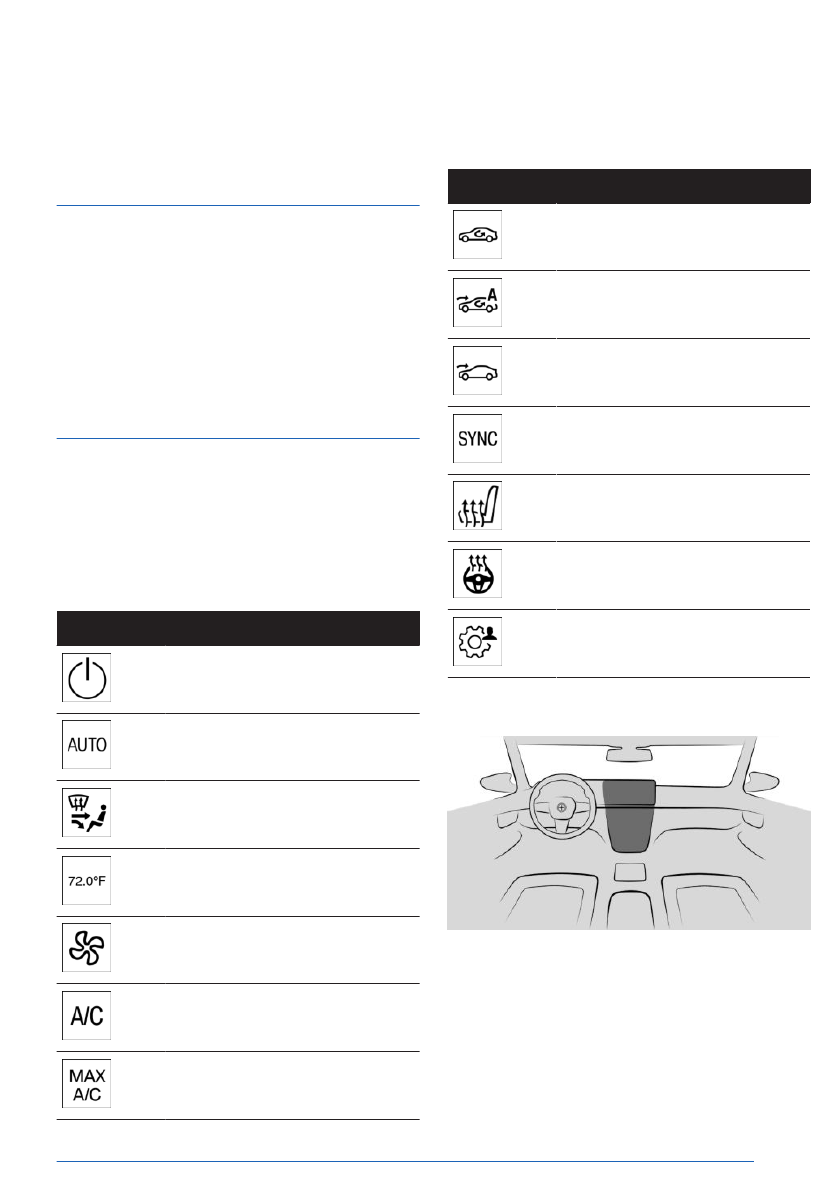
Functions in the Climate menu
Climate control functions, e.g., seat heating or
air flow, can be adjusted from the Climate Con-
trol menu on the control display.
Icon
Function
Turn the air conditioning sys-
tem on/off.
Automatic program.
Manual program.
Temperature in the vehicle in-
terior.
Air flow.
Air conditioning.
Maximum cooling.
Icon
Function
Air recirculation mode.
Automatic air recirculation.
Fresh air.
SYNC program.
Seat heating.
Steering wheel heating.
Settings.
Buttons, air conditioning system
The defrost function and rear window heating
can be turned on/off using the center console.
Climate control
Controls
279
Online Edition
At the same time, a condensation sensor con-
trols the automatic program in order to prevent
window condensation to the extent possible.
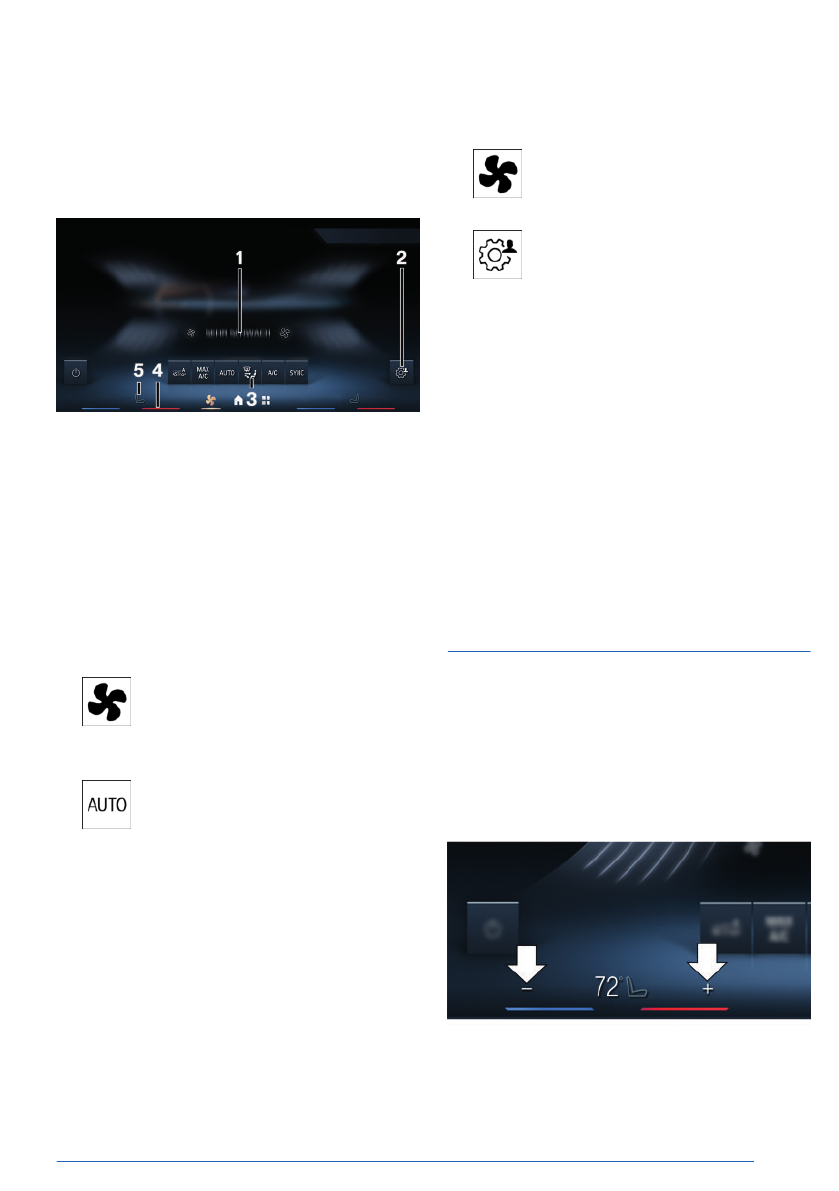
Overview
1
Air flow intensity
2
Settings
3
Climate control functions bar
4
Temperature
5
Seat heating
Steering
wheel heating
Turning the automatic program
on/off
1.
To turn the automatic program
on/off, tap the Climate Control menu icon
on the menu bar.
2.
Tap the automatic program button.
Setting the intensity
When the automatic program is activated,
the intensity of individual climate control func-
tions, e.g., seat heating, is adjusted individu-
ally.
1.
Select the Climate menu icon on the
menu bar.
2.
Tap the settings button.
3.
"Individual settings"
4.
"Driver" or "Front passenger"
5.
Select the desired setting.
Each level has a specific control range of the
intensity.
Based on the
stored data models, the intensi-
ties are dynamically adjusted while driving. It is
not necessary to manually change the desired
intensity to lower or higher
levels while driving.
Custom settings for climate control functions
are saved and applied automatically, e.g., after
the vehicle is started.
Temperature
Principle
The air conditioning system cools or heats to
the set temperature, keeping the temperature
constant.
Setting the temperature
The desired temperature can be set individu-
ally for the driver's side and front passenger
side:
Climate control
Controls
281
Online Edition
In recirculated-air mode, the air conditioning
is automatically turned on to dry the air and
avoid window
condensation.
Depending on the weather, the windshield and
the side windows may fog up briefly when
drive-ready state is switched
on.
Condensation may form in the vehicle air-con-
ditioning system. Condensation leaking under
the vehicle is due to technical reasons and
does not constitute a malfunction.
Maximum cooling
Principle
Maximum cooling is used to cool the vehicle
interior quickly and
effectively.
The lowest temperature and the maximum air
flow are set automatically.
Functional requirements
To use Maximum Cooling, the following func-
tional requirements must be met:
▷
Drive-ready state is switched on.
▷
The outside temperature is higher than
32℉ / 0℃.
Turning maximum cooling on/off
1.
To turn maximum cooling on/off, tap the
Climate Control menu icon on the menu
bar.
2.
Tap the maximum cooling button.
Air flows out of the air vents to the upper body
area. Open the vents.
Air recirculation mode
Principle
With air recirculation, if unpleasant odors or
pollutants are detected in the outside air, the
outside air supply can be temporarily stopped.
The interior air is
recirculated.
With automatic air recirculation, outside air is
fed in, or the interior air is recirculated, de-
pending on the outside air
quality.
When air recirculation is off, outside air is chan-
neled into the
interior.
The interior filter cleans the incoming fresh
air or the circulated interior air in recirculation
mode.
General information
If there is window condensation, turn off the air
recirculation.
Turning air recirculation on/off
1.
To turn air recirculation on/off, tap
the Climate Control menu icon on the menu
bar.
2.
The current operating mode is displayed on
the climate control functions bar. Tap the
button until the desired operating mode is
set.
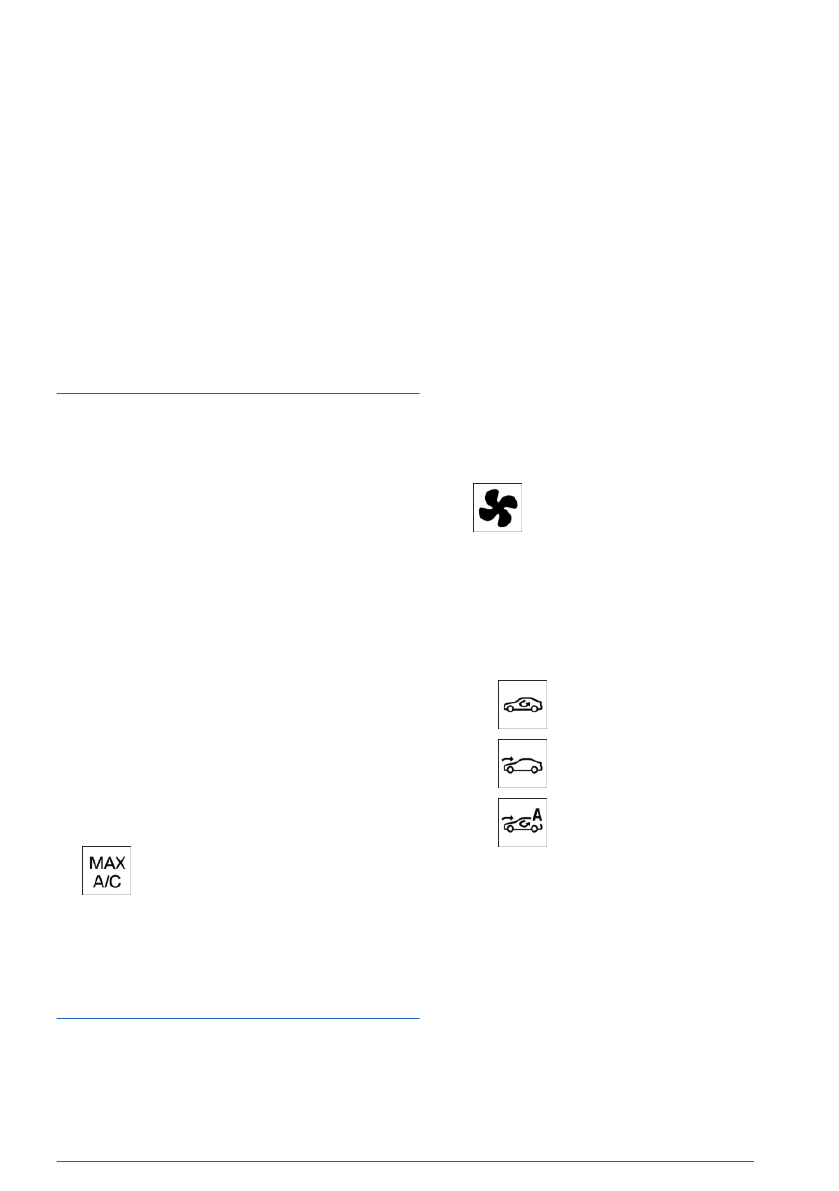
▷
Recirculating air.
▷
Fresh air.
▷
Automatic air recirculation.
Depending on vehicle equipment, the air recir-
culation turns off automatically after some time
based on the ambient conditions in order to
prevent condensation.
Climate control
Controls
283
Online Edition

The LED illuminates when the rear window
heating is turned on.
To keep the rear window heating on, press
and hold the button for at least 3 seconds.
Seat heating
Principle
When the seat heating is used, seats are
heated depending on the outside temperature
and the interior temperature.
General information
If the trip is continued within approx. 15 mi-
nutes after an intermediate stop, the functions
are turned on automatically with the tempera-
ture that was last set.
Adjusting seat heating
Automatic program
When the automatic program is activated, the
intensity of seat heating can be adjusted. As
you drive, the heater output is automatically
adjusted according to your set intensity.
Adjusting seat heating manually
The heater output level can be adjusted man-
ually:
1.
Select the icon for seat climate control on
the menu bar, arrow 1.
2.
Tap the seat heating button repeatedly
until the desired level is selected, arrow 2.
To turn off the seat heating, press and hold the
seat heating button for
approx. three seconds.
If a consumption-optimized drive mode is se-
lected, the heater output is reduced.
Steering wheel heating
Principle
When the steering wheel heating is used, the
steering wheel is heated depending on the
outside temperature and the interior tempera-
ture.
Adjusting steering wheel heating
Automatic program
When the automatic program is activated, the
intensity of steering wheel heating can be ad-
justed. As you drive, the heater output is auto-
matically adjusted according to your set inten-
sity.
Adjusting steering wheel heating man-
ually
The heater output level can be adjusted man-
ually:
Climate control
Controls
285
Online Edition

▷
Dust and pollen is filtered out from the in-
flowing air.
▷
Nano-particle emissions are reduced.
▷
Gaseous pollutants are filtered.
▷
Microbial particles, viruses and allergens
are filtered.
The manufacturer of the vehicle recommends
having the interior filter changed during vehicle
maintenance.
Pre-ventilation
Principle
Pre-ventilation is used to cool or heat the ve-
hicle interior before beginning a drive. Depend-
ing on the set temperature and ambient tem-
perature, the vehicle interior is ventilated or,
depending on model variant, heated using the
residual engine
heat.
The system can be switched on and off directly
or via a preset departure
time.
The activation time is determined based on
the outside temperature. The system promptly
switches on before the selected departure
time.
The system
switches off automatically after a
certain period of time. The system continues to
run for some time after being switched off.
Functional requirements
To use the preventilation, the following func-
tional requirements must be met:
▷
The vehicle is in idle state or standby state.
▷
The vehicle battery is
sufficiently charged.
If pre-ventilation is switched on, the vehicle
battery will be discharged. Thus, limit the
maximum activation time to save the vehi-
cle battery. System can be used again once
engine is started or after a short drive.
▷
Time and date are set correctly.
▷
The air vents are open.
Switching pre-ventilation on/off
1.
Select the Climate menu icon on the
menu bar.
2.
Tap the settings button.
3.
"Pre-ventilation"
4.
Select the desired setting.
Departure time
Principle
Different departure times can be set to ensure
a comfortable interior temperature in the vehi-
cle at the time of departure:
▷
One-time departure time: the time can be
set.
The system is
switched on once.
▷
Departure time with weekday: time and day
of week can be set.
On
the desired weekdays, the system will
be switched on before the set departure
time.
The departure time is preselected in two steps:
▷
Set the departure time.
▷
Set the departure time.
Preventilation at the departure time can only
be activated once.
Wait
at least 10 minutes between setting and
activating the departure time and departing at
the planned time. This gives the air condition-
ing sufficient time to bring the vehicle interior
to the desired temperature.
Climate control
Controls
287
Online Edition

▷
The fuel tank is at a sufficient level.
▷
The hood is closed.
▷
Time and date are set correctly.
▷
The air vents are open.
Enabling the automatic engine start
function
The automatic engine start must be enabled
before using the system. Otherwise, the en-
gine cannot switch on automatically to air-con-
dition the vehicle interior.
1.
To enable automatic engine start-
ing, tap the Climate Control menu icon on
the menu bar.
2.
Tap the settings button.
3.
"Pre-conditioning"
4.
"Remote Engine Start"
5.
"Start engine for climate control"
6.
Confirm the legal disclaimer.
Turning on/turning off the pre-con-
ditioning
General information
The pre-conditioning turns off automatically
after max. 15 minutes for
safety reasons.
The pre-conditioning can only be activated
twice in a
row.
Pre-conditioning can be used again as soon as
drive-ready state is activated and then deacti-
vated again.
Switching on via iDrive
1.
Select the Climate menu icon on the
menu bar.
2.
Tap the settings button.
3.
"Pre-conditioning"
4.
"Start now"
Switching on/off via vehicle key
Pre-conditioning can be turned on/off using
the vehicle key:
Press the lock button on the vehicle key
three times within
1 second.
The engine turns on approx. 3 seconds
after the vehicle key is pressed.
To turn off the pre-conditioning, press the but-
ton again three times within 1 second.
Turning off with the Start/Stop button
Pre-conditioning can be turned off directly
by pushing the Start/Stop button without de-
pressing the brake pedal.
Air conditioning for departure time
Principle
Scheduled departure times can be set up in
the system to ensure a comfortable interior
temperature in the vehicle at the time of depar-
ture:
▷
One-time departure time: the time of the
scheduled departure can be
set.
Pre-conditioning is turned on once.
▷
Departure time with weekday: Time and
day of week for the scheduled departure
can be set.
The departure time is preselected in two steps:
▷
Set the departure time.
▷
Activate departure times.
Climate control
Controls
289
Online Edition


